
Tesla Window Sticker Lookup by VIN
Want to know the original details of a Tesla before buying or selling it? Getting a Tesla window sticker by VIN provides access to specs, including MSRP, standard and optional features, fuel economy, safety ratings, and more.
Table of Contents:
What is a Tesla Window Sticker?
A Tesla window sticker is the original label that lists the car's factory details. You'll see the VIN, battery and motor setup, range rating, colors, software packages, safety features, MSRP, and any options it came with. It basically tells you how the car was built when it rolled out of production.
Many people use it to double-check that a Tesla still matches its original configuration. It also helps buyers understand the real value of the vehicle before making a decision.
Why Do You Need Tesla Window Stickers Lookup?
Tesla window stickers lookup provide all vehicle specifications car buyers and sellers need to make smart decisions about car purchases and sales. Here are some benefits of window stickers:
Buyers
Know the Original Specs
Compare several vehicles with features, packages, and options to make the best pick.
Verify Authenticity
With a Tesla window sticker, buyers can confirm if a vehicle matches the seller’s description.
Check Fuel Economy
Compare the city/highway MPG before buying to be sure it meets your needs.
Sellers
Highlight Unique Features
Showcase the original features, options, and packages that come with a vehicle.
Justify Pricing
Use the original MSRP and specs to support your asking price and get faster sales.
Stand Out in Listings
A window sticker can make your ad more professional and build trust.
What's Inside a Tesla Window Sticker by VIN?
A Tesla window sticker by VIN is equipped with detailed information about your car. Here's what you can find in a Tesla window sticker:
Standard Features
Check the equipment and configuration included when the vehicle was built. You can check the interior technology, exterior equipment, battery and drivetrain specifications, charging features, and safety systems.
Interior Features
Review factory-installed cabin equipment such as premium seating, heated and ventilated seats, touchscreen displays, wireless smartphone charging, premium audio systems, dual-zone or multi-zone climate control, glass roofs, power-adjustable seats, and other technology or comfort features.
Exterior Features
Check the original exterior equipment, including LED lighting, aerodynamic wheel designs, power-operated liftgates, glass roof configurations, exterior trim, power-folding mirrors, door handles, and other factory-fitted exterior details.
Technology and Driver Assistance
Identify technology included with the Tesla, such as Autopilot features, parking assistance, camera-based driver assistance systems, navigation, over-the-air software capabilities, and other electronic systems available for the specific model and configuration.
Options and Packages
Tesla's factory equipment can vary by model, trim, battery configuration, wheel selection, interior package, and software-related features. The window sticker helps identify equipment and upgrades included in the vehicle's original configuration.
Exterior and Appearance Upgrades
Factory selections may include larger or performance-oriented wheels, upgraded wheel designs, special exterior paint colors, black exterior trim, carbon-fiber details on applicable performance models, and other appearance enhancements.
Interior Customization
Available interior choices can include different upholstery colors, premium interior packages, upgraded seating, special trim finishes, enhanced audio equipment, rear-seat displays, and other cabin upgrades offered for the specific Tesla.
Performance Upgrades
Depending on the model, factory equipment may include dual-motor all-wheel drive, larger performance wheels and tires, upgraded brakes, sport-oriented suspension components, and other equipment associated with Performance or higher-output configurations.
Software and Advanced Features
Certain Tesla configurations can include software-based features and upgrades associated with driver assistance, navigation, connectivity, or other vehicle functions. The availability and pricing of these features can vary by model, model year, and the vehicle's original configuration.
Original MSRP and Total Price
The original pricing section shows how the Tesla was configured when it was first sold. It can include the base vehicle price, factory-selected options, wheel or interior upgrades, software-related charges, destination fees, and other applicable charges shown on the original sticker.
Base MSRP
Check the original MSRP for the Tesla before factory options and other chargeable equipment were added.
Option Pricing
Review the individual prices of factory-installed options, packages, wheel upgrades, interior selections, and other listed additions.
Final Price
See the original vehicle price after applicable options, upgrades, destination charges, and other listed factory charges have been included.
Exterior and Interior Colors
Tesla offers different exterior paint colors and interior combinations depending on the model and model year. The window sticker helps verify the original factory color and cabin configuration.
Exterior Paint
Displays the original factory paint color and finish assigned to the Tesla. Depending on the model and production period, available colors can include solid, metallic, multi-coat, and other premium finishes.
Interior Color and Upholstery
Identifies the original interior color and seating material. Tesla interiors can include different combinations of black, white, or other available color schemes and synthetic leather upholstery depending on the model and year.
Interior Trim and Accents
Shows factory-installed cabin details such as wood-look trim, carbon-fiber accents, aluminum finishes, contrasting materials, premium seat designs, and other interior styling elements.
Battery, Powertrain, and Transmission
This section shows the detailed information on the electric propulsion system originally installed in the Tesla. This information helps verify the vehicle's factory battery, motor, drivetrain, and transmission configuration.
Battery and Motor Configuration
Identifies the original battery and electric motor setup, such as a single-motor rear-wheel-drive configuration or dual-motor all-wheel drive.
Transmission Type
Displays the original transmission configuration. Tesla vehicles generally use a single-speed reduction gear rather than a conventional multi-speed automatic or manual transmission. The specific drive unit and reduction gear configuration can vary by model and drivetrain.
Drive System
Check the car’s drivetrain configurations, including rear-wheel drive or all-wheel drive. Dual-motor Tesla models use separate electric motors to provide all-wheel-drive capability, while applicable single-motor versions drive either the front or rear wheels depending on the model and configuration.
Wheelbase and Tires
Wheelbase, wheels, and tires help verify the Tesla's original dimensions and factory chassis setup.
Wheelbase Information
Shows the original wheelbase assigned to the vehicle. Specifications vary across Tesla models and help distinguish the dimensions and chassis characteristics of vehicles such as the Model 3, Model Y, Model S, and Model X.
Wheel and Tire Specifications
Lists the factory wheel size, wheel design, and original tire dimensions. Depending on the configuration, this can include different wheel sizes, performance-oriented tires, staggered fitment on applicable models, and low-rolling-resistance tires designed for efficiency.
Gross Vehicle Weight Rating (GVWR)
The GVWR section identifies the maximum allowable loaded weight established for the Tesla according to its original factory configuration.
Safe Load Rating
Shows the maximum permitted combined weight of the vehicle, occupants, cargo, and applicable equipment.
Axle Weight Ratings
Where provided, the original documentation may include front and rear axle weight ratings. These figures indicate the maximum load assigned to each axle.
Manufacturer Warranty
The original factory warranty provides information about the coverage Tesla offered when the vehicle was originally sold. Coverage can vary according to the model, model year, battery configuration, and specific component.
Basic Vehicle Warranty
Covers eligible vehicle components against defects in materials or workmanship during the applicable warranty period.
Battery and Drive Unit Warranty
Provides separate coverage for eligible battery and drive unit components. Coverage terms can vary based on the Tesla model, battery configuration, and vehicle version.
Supplemental Coverage
Tesla may provide separate limited-warranty coverage for systems such as the Supplemental Restraint System, including airbags and seat belts, as well as body-rust perforation and certain Tesla-approved replacement parts or accessories. Exact terms depend on the vehicle and the applicable warranty documentation.
Fuel Economy
Because Tesla vehicles are fully electric, their U.S. window stickers use EPA electric-vehicle efficiency information, including MPGe and electricity-consumption figures, rather than traditional gasoline MPG.
MPGe and Energy Consumption
Displays applicable EPA-estimated city, highway, and combined MPGe figures, along with electricity-consumption information for the specific Tesla configuration.
Estimated Driving Range
Shows the EPA-estimated driving range assigned to the vehicle when applicable. Range can vary by model, battery configuration, wheel selection, software, and model year.
Charging Information
Actual charging times depend on the charger, battery condition, temperature, and available electrical power.
NHTSA Safety Rating
Tesla vehicles sold in the United States must meet applicable federal motor-vehicle safety requirements. NHTSA crash-test ratings are specific to the Tesla model, configuration, and model year evaluated by the agency.
Frontal Impact
Provides the vehicle’s available frontal crash-test results.
Side Impact
Lists applicable side-impact test ratings.
Rollover Resistance
Shows the available NHTSA rollover resistance rating.
Easy Steps on How to Get a Tesla Window Sticker
Getting a Tesla window sticker by VIN is an easy process. Here’s how you can do it step-by-step:
Step 1: Find the VIN
You can find the VIN in places like the door jamb, on the dashboard near the windshield, or in your vehicle documents, such as insurance or registration papers.
Step 2: Enter the VIN
Type the VIN in the form box above to begin the process.
Step 3: Download the Window Sticker
After processing, download the Tesla window sticker PDF to read the report wherever you want.

REAL BUYER STORY
How Sarah Exposed a Used Car Dealer's Fake Premium Package
Sarah found a 2022 Tesla Model S listed for $114,000 at a used car lot. The dealer's pitch was smooth:
- "Enhanced Autopilot package included – $6,000 value"
- "Premium interior upgrade – another $4,500"
- "Performance boost activated – $2,000"
- "You're getting $12,500 in upgrades over base price"
The Red Flag
Something felt off. Sarah requested the VIN and pulled the original window sticker before her second visit.
What She Found
Original MSRP was $106,190 and not $118,690 as claimed
"Enhanced Autopilot"? Already standard on this trim
"Premium interior"? Listed as standard equipment with $0 extra
The car had ZERO optional packages beyond the base Midnight Silver Metallic paint
The dealer was trying to charge her $8,000 for features that came free from the factory.
🛑 $8,000 scam avoided | ✅ Walked away with confidence
Don't let dealers invent fake upgrades. Get the window sticker first.
Locating the VIN on Your Tesla
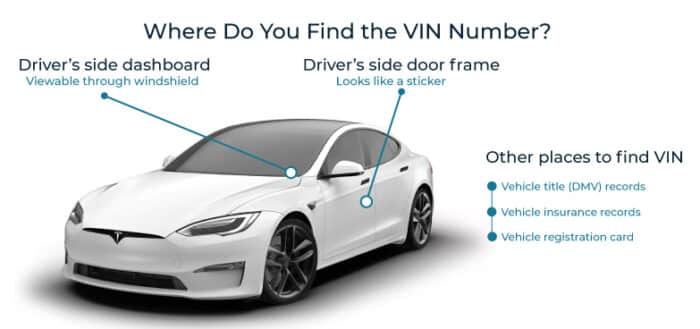
Finding the VIN on a Tesla is simple. Here are some common locations:
- Vehicle Documents: The VIN is listed on your car’s title, registration, and insurance documents.
- Door Jamb: Look for a sticker inside the driver-side door jamb.
- Dashboard: Check near the base of the windshield on the driver’s side.
We Have Window Stickers by VIN for All Tesla Models!
Can’t find the window sticker by VIN for a rare Tesla model? With our Tesla window sticker lookup tool, you can access window stickers for all Tesla models, including:
Why Use Our Tesla Window Sticker Lookup Service
Tesla vehicles often change with over-the-air updates, package revisions, and running production changes. A window sticker helps you see exactly what the car included when it first left the factory.
Instant Factory Feature Check
View the original battery configuration, Autopilot package, and interior specs in seconds.
Trusted and Update Data Source
Get up-to-date vehicle data from DMV, auctions, police, insurance, and proprietary online sales sources.
Works for All Tesla Models
Check any Model S, 3, X, or Y, including earlier versions with unique hardware setups.
Support Available Anytime
If you have questions about a feature or package, our team is available 24 hours a day.
What Our Customers Say
This site is fantastic - I received the "original" window sticker for my vehicle! Great customer service as well - I had a small issue and "Richard Langridge" sorted it out right away! Thanks you - Thumbs up - will definitely use this site again!
I was researching an older vehicle and there was a bit of difficulty getting a copy of the window sticker. I was assured by the live agent, Sam it would come through in a couple hours. It did. Thanks, Sam!
DVH exceeded expectations for my family, we now have all window stickers for all of our cars. Even received a follow up call to ensure all needs were met. Thank You 🙏🏽
Try Our Other Tesla VIN Tools
A window sticker is not enough for used car buyers. You need to view past records, maintenance history, theft records, ownership history, and more with our other Tesla VIN tools.
Tesla VIN Decoder
Decode your Tesla VIN for complete details about your car, including specs, theft records, accidents, damages, title brands, and more.
Tesla Recalls History
Check for any outstanding recalls or defects in a Tesla vehicle. You can verify a vehicle's safety and roadworthiness.
Tesla Service Records
Access detailed service, repair, and maintenance history for any Tesla. Verify the actual condition of any vehicle and plan for future repairs.
FAQs About Tesla Window Stickers
What is a Monroney Sticker?
A Monroney sticker is the mandated window label, for every car sold in the United States. It displays the vehicle's price, standard equipment, available options, safety scores and fuel economy information.
For Tesla buyers or sellers, a Tesla monroney label lookup lets you see this same information even after the car has left the dealership, so you can review the factory build details whenever you need them.
Can you get a Tesla MSRP from VIN?
You can find the MSRP by entering the VIN into the form above and downloading the window sticker. This will provide you with the original manufacturer's suggested retail price and other important details such as factory options, trim level, and additional features.
What year is covered by this Tesla window sticker lookup?
Our service covers most Tesla models, from early production to the latest releases. The exact date depends on the availability of records.
How can I find a Tesla window sticker if I don’t have the VIN?
If you don't have the VIN, you can retrieve the window sticker by using your Tesla license plate number and its Year, Make, and Model (YMM).
Can I get a window sticker by VIN?
Of course. You can get the window sticker by simply decoding the VIN. Click on the form above, enter the VIN, make payment to obtain the window sticker in pdf format.
Can a Tesla window sticker verify the original battery size and driving range?
Yes. DetailedVehicleHistory.com’s Tesla monroney label explicitly lists the battery’s kWh capacity, the onboard charger rating, and charge times at different voltages. It also shows the official EPA‑rated driving range in miles, along with combined MPGe and kWh‑per‑100‑miles figures. This makes the sticker a reliable source for confirming both the battery capacity and the range the vehicle was rated for when new. However, real‑world range can vary from the EPA estimate depending on driving conditions and battery degradation over time.
How can a Tesla window sticker confirm Dual Motor, AWD, or Performance models?
The original window sticker explicitly states the exact drivetrain configuration of the vehicle. It details whether the car is a Rear Wheel Drive, All Wheel Drive, or a high end Performance model. Look at the main description section to quickly find the dual motor badge status. This makes it easy to confirm that you are getting the premium motors you pay for.
Does a Tesla window sticker show Autopilot or Full Self Driving (FSD) features?
A factory sticker lists any advanced driver assistance systems that were purchased at the time of the original sale. You can see whether the car left the factory with base Autopilot, Enhanced Autopilot, or the premium Full Self‑Driving capability. Keep in mind that software packages can be altered by previous owners or changed later through digital subscriptions. For the current status of FSD/Autopilot on a used car, check the Tesla account tied to the VIN (the seller can show this in the Tesla app) rather than relying solely on the original sticker.
How can a Tesla window sticker verify charging and Supercharging capability?
The window sticker shows details about the car’s charging hardware, including the onboard charger’s power rating in kilowatts and estimated charging times at common voltage levels such as 240V and higher‑voltage DC charging. It also confirms whether the vehicle is compatible with the Tesla Supercharger network worldwide. This information makes it clear how quickly the car can recharge its battery, which is especially useful for planning long trips.
Can a Tesla window sticker confirm original interior, seating, and trim configurations?
Yes, DetailedVehicleHistory.com’s tesla window sticker lists all of the specific cabin styling options chosen by the first buyer. It details the exact seating layouts, premium materials, and distinctive dashboard trim options. It also clarifies whether the vehicle includes five, six, or seven seats. Reviewing these details helps ensure the car has not been altered with low‑quality aftermarket parts.
Does a Tesla window sticker reveal Tesla hardware generation details?
The window sticker does not explicitly include technical internal terms such as Hardware 3 or Hardware 4. For a definitive hardware version, check the car’s Autopilot or Full Self‑Driving computer information in the vehicle’s settings screen, or have a service center confirm it directly.
Can a Tesla window sticker help verify performance specifications and upgrades?
The window sticker can confirm factory options such as upgraded wheels or a Performance package if they were part of the original configuration. It does not provide crash test safety ratings. In many cases, especially for newer or lower‑volume models, the sticker shows “Not Rated” across all NHTSA categories because testing may not have been completed or published for that specific configuration.