
Build Sheet by VIN Lookup Made Easy
A build sheet by VIN gives you a clear look at how a vehicle was originally built. You can see its factory equipment, colors, mechanical setup, option packages, and all specs in one simple glance. Easily understand a car’s true features with more confidence.



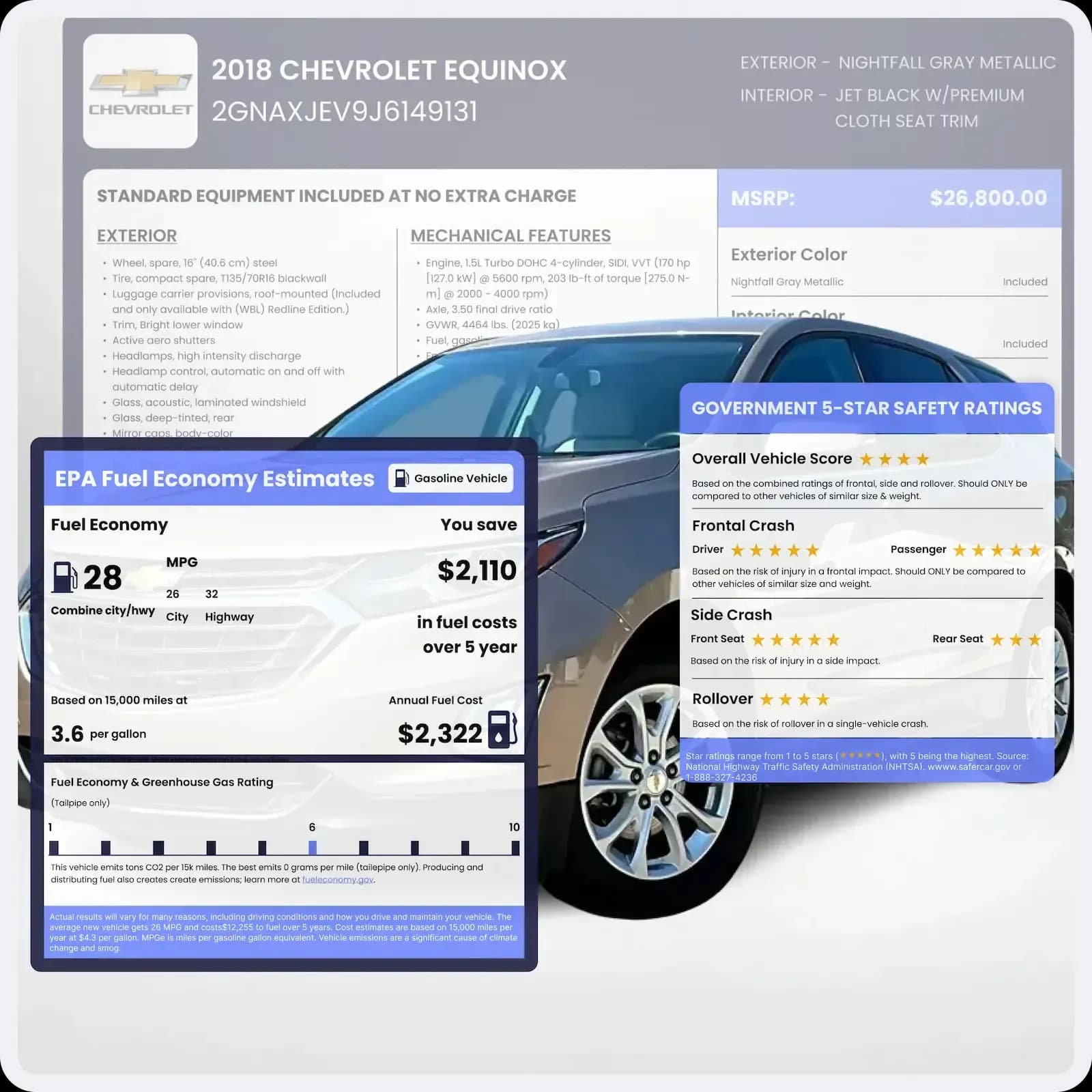
What Is a Vehicle Build Sheet?
A vehicle build sheet is a detailed document created by the manufacturer at the assembly plant. It lists the exact parts, configurations, and options chosen for that specific VIN.
Most people never see this document when buying a used car, but the factory relies on it heavily. It guides everything from drivetrain selection and interior materials to engine calibration and wheel configuration.
Build sheets can also include technical identifiers that matter a lot to collectors or anyone comparing trim levels. You will find paint and trim specs, axle ratios, engine and transmission specs, color combinations, and more. Once you see it, you understand the vehicle with far more clarity.
Common Mistakes People Make Without Checking a Build Sheet
A lot of confusion around used cars comes from not knowing how the vehicle was actually built. A quick look at the build sheet can prevent problems that often show up later. Here are a few common mistakes people make when they skip this step:
Wrong Trim Assumptions
It is easy to assume a vehicle includes heated seats, a towing package, or a certain engine just because it looks like a higher trim. The build sheet clears this up before money is exchanged.
Paying for Aftermarket Add-Ons
Some upgrades look original even when they were added later. The build sheet shows what truly came from the factory, helping you avoid paying extra for non-factory modifications.
Restoring with Incorrect Parts
Without the build sheet, it is common to choose paint codes or interior materials that do not match the original setup. This can lower the value of a classic or collector car. The build sheet keeps the restoration accurate.
Assuming the Drivetrain Is Original
Engines and transmissions get replaced more often than people realize. A build sheet lets you compare the factory specs with what is in the vehicle today so you know exactly what has changed.
Why a Build Sheet Matters for Buyers and Sellers?
A build sheet might look technical at first, but it clears up a lot of things people wonder about when buying, selling, or restoring a car. It shows the vehicle as it was built, not as it appears today.
Here is how different groups benefit from getting a build sheet by VIN:
Buyers
Confirm original features:
The build sheet shows the true factory configuration, which lets you compare it with what is being advertised.
Spot upgrades or missing items:
If something is not original or if an option is missing, you will notice it quickly with the help of a build sheet.
Negotiate with confidence:
When you know the real trim and equipment, pricing conversations become easier.
Sellers
Show transparency:
Sharing the build sheet helps buyers trust you because it provides clear, verified information.
Support the asking price:
Premium factory options or special packages look more convincing when they appear in the build sheet.
Reduce repetitive questions:
Buyers get their answers upfront, which helps speed up the sale and keeps the whole conversation more straightforward for everyone.
For Enthusiasts and Restorers
Use it as a rebuild guide:
The sheet lists the correct colors, materials, axle ratio, and key specs, giving you a simple reference for accurate restoration work.
Simplify part sourcing:
Knowing the exact factory components makes finding the right replacement parts quicker and far less confusing.
Preserve originality:
It helps you bring the vehicle back to its true factory form, which is important for collectors and anyone who values authenticity.
What Information Will You Be Getting From a Build Sheet?
A build sheet gives you a wide view of the vehicle’s original design. Some details are highly technical, while others are easier to understand, but they all help you build a true picture of the car.
Here’s what you will find with a build sheet lookup:
Vehicle Description
This section includes the year, make, model, exterior paint specs, interior trim, upholstery materials, and the specific combinations chosen by the factory. It helps you verify originality and understand the exact look the vehicle had when it rolled off the line.
Engine and Transmission Specs
You will find the engine family code, engine displacement, type of aspiration, horsepower rating, transmission code, and other relevant mechanical identifiers. These data simplify comparing trims, gauging performance, and verifying if the drivetrain has been altered throughout time.
Axle Ratio and Drivetrain Configuration
This shows how the vehicle was geared from the factory. You will find axle ratios, differential type, and whether the car was built as front-wheel drive, rear-wheel drive, all-wheel drive, or four-wheel drive. This is important for towing, performance tuning, and restoration work.
Options and Packages
If the vehicle came with special packages, appearance upgrades, premium interior materials, or performance enhancements, they will be listed here. This section shows you all factory-installed options tied to that VIN.
Suspension, Steering, and Wheel Specifications
You will see information related to the suspension setup, shock type, steering system, and wheel size. These details are especially valuable for mechanics and restorers who want correct replacements.
Production Data
Many classic build sheets include production dates, build sequences, and assembly locations. These details help verify authenticity and uniqueness. They can also indicate production rarity among collectors.
MSRP, Shipping, and Total Cost
Build sheets also include original pricing information. This covers the base MSRP, option costs, shipping charges, and the vehicle’s total factory price. It provides useful context when comparing other models and finding out what the vehicle was worth originally.
Standard Equipment and Features
You will find a full list of factory-standard features, including mechanical equipment, interior basics, infotainment items, and safety components. This is helpful for comparing trims.
Exterior and Interior Features
This section covers the vehicle’s lighting setup, mirrors, seat materials, dashboard layout, and other comfort or styling details that came from the factory. It helps you understand the overall design choices the manufacturer made for that exact model.
Interior and Exterior Colors
You will find the original interior and exterior color combinations along with factory paint descriptions. This is useful for verifying authenticity and makes restoration or cosmetic matching much easier.
Safety and Security
The VIN build sheet lists the factory-installed safety systems, such as airbags, seatbelt types, warning sensors, and other protective features. These details help you see what safety technology the vehicle had from day one.
Warranty Information
Some build sheets (for modern vehicles) include an overview of the vehicle’s original warranty coverage, including powertrain protection, corrosion coverage, roadside assistance, and maintenance plans.
It gives you a clearer picture of the support the manufacturer offered when the vehicle was new.
EPA Fuel Economy and Environment Ratings
These ratings outline the vehicle’s city and highway fuel economy, estimated annual fuel costs, and overall environmental impact. They give you a simple way to understand how efficient the vehicle was designed to be from the factory.
NHTSA Safety Rating
You will see safety scores from the National Highway Traffic Safety Administration, based on official crash tests and evaluations. These ratings help buyers judge the vehicle’s safety performance with more confidence.
Case Study: The $6,000 Mistake a VIN Check Would Have Prevented
Same listing. Same seller. The only difference was whether the buyer ran a VIN check before handing over their money.
Scenario: Buying a used 2017 Ford Fusion 2.0L from a private seller in California.
The Situation
Asking price: $9,800
Seller's claim: "Well-equipped"
Use case: Delivery / cargo
Outcome
Negotiated final price
$6,800
Based on verified factory specs
What Kevin Did
He got a build sheet by VIN to verify the exact factory configuration before negotiating.
What the Build Sheet Proved
- Original MSRP: $22,930
- Standard cargo configuration
- 4.3L V6, rear-wheel drive
- Cloth interior, no premium packages
- No factory upgrades matching the listing claims
$3,000
Kevin used the build sheet as proof that the van was a standard configuration. The seller adjusted the price once the actual specs were clear.
Price justified by spec: Base model
You can’t negotiate what you can’t prove. Verify the Build Before You Buy!
Can I Get a Build Sheet from a VIN Number?
Yes. A build sheet can be generated from any VIN number. Modern vehicles use a standardized 17-character VIN, while older and classic vehicles may use shorter variations within 5 to 14 digits. Our system is designed to handle both formats. Classic VIN decoding is available and can retrieve information for less than $40 per report.
How to Get a Build Sheet from a VIN?
Before you start, all you need is the VIN. The process is quick, and once completed, you will receive a digital copy of the build sheet that shows exactly how the vehicle was configured at the factory. Simply follow these steps:
Step 1: Find the VIN
Most VINs can be found on the driver’s side doorjamb or at the bottom of the windshield. You can also check the registration, insurance card, or vehicle title.
Step 2. Enter the VIN in the Form
Type the full 17 characters into the search form. If you are checking a classic car with a shorter VIN of 5 to 14 digits, the system can decode those as well.
Step 3. Download Your Build Sheet
Once the lookup is complete, your build sheet will be ready. Save it as a digital file (PDF) or print it for your personal records.
No VIN?
If you have the plate number or even just the year, make, and model, you can still request a complete build sheet. Just fill the form above.
Why Choose Our Build Sheet Tool?
Choosing the right build sheet tool matters when you want accurate and easy-to-read factory information. Our lookup is designed to be quick, reliable, and helpful for anyone who needs clear details about a vehicle’s specs. See why we stand out:
Instant Results
Build sheets load in seconds for quick checks.
Supports Classic VINs
Works with modern and vintage VIN formats easily.
More Detailed Data
Shows factory colors, options, and technical specs clearly.
Trusted and Update Data Source
Get up-to-date vehicle data from DMV, auctions, police, insurance, and proprietary online sales sources.
Designed for Real Buyers and Sellers
The report layout is clean, readable, and straightforward.
24/7 Customer Assistance
Help is available anytime with friendly support.
Alternative Methods on How to Find a Build Sheet?
There are several reliable methods to locate a vehicle’s build sheet using its VIN (Vehicle Identification Number). Each option offers different levels of detail and accuracy, depending on what you’re looking for.
Online Forum
Car enthusiasts often visit automotive forums like Reddit or brand-specific communities to ask whether anyone has a copy of a window sticker or build sheet for a similar vehicle. While this approach can be helpful for comparison, it may not always provide verified or complete information.
Manufacturer’s Website
Many car brands include a VIN lookup tool on their official websites. By entering your VIN, you can sometimes access the original build sheet or factory specifications directly from the manufacturer’s database. This is often the most accurate and trustworthy source for factory details.
Online VIN Decoder
Online VIN decoders, such as the NHTSA VIN decoder, can provide basic information about a vehicle, such as the year, make, model, transmission, etc. But if you want more details, such as upgrades, options, interiors, and exterior selections, a build sheet by VIN tools like ours is the way to go.
Can You Get a VIN Build Sheet for Free?
You can get some basic information from free VIN tools, but a full factory build sheet is almost never available at no cost. Most manufacturers only share limited details, such as general specs, engine information, and recall data, through their online lookups or the NHTSA decoder.
Free tools are helpful for quick checks, although they do not include factory option lists, package details, or the full configuration of the vehicle. If you want the complete picture, a paid build sheet lookup is usually needed.
Below is a comparison between the free NHTSA results and the more detailed build sheet you receive from Detailed Vehicle History:
| NHTSA Free VIN Decoder | VIN Build Sheet |
|---|---|---|
Make, Model, and Year | ||
Engine Type & Transmission | Limited | |
Vehicle Options & Packages | ||
MSRP | ||
Pricing Breakdown | ||
Safety Rating | ||
Fuel Economy | ||
Upgrades and Packages |
Hear From Our Customers
Wow! GREAT support and customer service…while the initial window sticker merely provided only the basic information; I was amazed that within the very hour following a kind e-mailasking that overlooked specific options and packages be added to the initial window sticker BOTH a support ticket was created as a reply to my e-mail along with a live phone call each made to build momentum to “getting it right.” For the $15 the whole team went above and beyond making 100% every effort to accurately describe my new vehicle.
First time using site and gave me rona sheet for my 2012 ram 1500 excitant service would recommend
I'm retired and been a "car guy" my whole life. Always enjoying looking a cars on various sites, BAT, Car.com, Auto Trader, Facebook Market Place. I was so very pleased at this service. One key question is "do you have the window sticker" - or can you find the option codes and send me a photo. I'd say less than 5% of people have access to the window sticker ( even on BAT where you are dealing with collector cars). Being able to see the original build sheet, which includes all important details, color inside and out, options, and surprisingly the retail value at delivery! Options make a huge difference. As an example a Porsche Cayenne S standard at deliver in 2013 was around $56,000 - a well optioned 2013 approaches $100,000. Often the second owner in particular has no idea the the vehicle they are selling has $44,000 of options! This is a great site. I would run any car I'm getting close to considering an offer and see the window sticker! It's truly amazing! Thank-you. I've owned 7 collector Porsches over the past 30 years! Wish I had access to the "window sticker. Ps. When you decide to sell you find potential buyers will love to see mention of the window sticker! in your ad!
Get Build Sheet for Specific Brands
If you need a build sheet for a specific brand, you can select from the list below. Each build sheet lookup uses the VIN to gather factory configuration details for that particular manufacturer:
FAQ about Build Sheet by VIN
Can I get a build sheet from a VIN number?
Yes. You can get a build sheet from a VIN number by using a Vehicle build sheet by VIN lookup tool. A VIN decoder build sheet search shows the vehicle’s original equipment, factory colors, drivetrain, and option packages tied to that exact VIN.
What's the difference between VINs and build sheets?
A VIN is a 17-character identifier that tells you basic information such as year, make, model, and engine type. A build sheet, on the other hand, shows how the vehicle was actually built at the factory. It includes color codes, option packages, axle ratios, equipment lists, and detailed configuration data.
A VIN on its own gives you the general identity. A build sheet by VIN shows the complete picture.
Can I get a window sticker from VIN?
Yes. A window sticker can be generated using the VIN, similar to a VIN decoder build sheet lookup. The difference is that a window sticker focuses on pricing, fuel economy, warranty info, and features shown at the dealership. A build sheet lists the deeper factory configuration.
Can I look up specs by VIN number?
Yes. You can look up specs by VIN number using a VIN decoder or a build sheet tool. A basic decoder shows standard Specs such as engine type, body style, and drivetrain. A VIN decoder build sheet gives you much more detail, including factory colors, option codes, packages, and production data.
How do I get a build sheet for a vehicle?
You can get a build sheet by entering the VIN into a build sheet lookup tool. The system pulls factory data tied to that VIN and generates a detailed build sheet. If you do not have the VIN, you can also get one with the license plate number or year, make, and model information.
Some people also try dealership requests or online forums, although results vary.
How do I find out what packages my car has?
This information is available in the vehicle’s build sheet or the original window sticker, which lists any packages or optional features installed at the factory. Our tool above lets you look up the original build sheet using VIN.
Can you look up the build date by VIN?
Yes, some manufacturers allow you to get the build date by VIN via the build sheet. However, they may only support recent models. If you have an older car (>10 years old), use the VIN tool’s build sheet. But if you only need the build year, our VIN year chart covers that.
Can a VIN show car features?
Yes, the VIN can show the vehicle’s trim, engine type, interior features, and other factory-installed options. You can access this information through the build sheet.
Can a build sheet confirm a vehicle’s original factory specifications?
Yes, a build sheet by VIN is one of the best ways to confirm a vehicle's original factory specifications. It shows exactly how the car was built at the factory, including the engine type, transmission, trim level, and installed features. This is especially useful when you want to verify car specs by VIN before buying a used vehicle. If the current setup does not match the build sheet, that is a red flag worth investigating.
Does a build sheet show all factory options and packages?
Yes, DetailedVehicleHistory.com’s build sheet lookup tool shows the complete list of factory options and packages that were installed when the vehicle was first built. This includes things like sunroofs, towing packages, upgraded audio systems, and special trim packages. Knowing the original factory options by VIN helps buyers understand what they are really getting. It also prevents sellers from claiming features that were never part of the original build.
Can a build sheet help verify vehicle authenticity?
Yes, a build sheet is one of the most reliable tools to verify vehicle authenticity using a VIN number. It gives you a direct record of how the vehicle left the factory, which you can compare to its current condition. This is especially important for classic cars, limited editions, and any vehicle where authenticity affects value. Authentic vehicle verification by VIN gives buyers and collectors real peace of mind.
Can a build sheet confirm matching numbers for engine and chassis?
A build sheet can help you check matching numbers on a car by VIN. It shows the original engine code and chassis details recorded at the time of production. If the numbers on the actual vehicle do not match what is on the build sheet, the engine or other major components may have been swapped out. Matching-numbers cars are worth significantly more, making this check essential for both collectors and buyers.
Can a build sheet affect a vehicle’s market value?
A build sheet can have a direct impact on a vehicle's resale value. Vehicles with original factory documentation tend to sell for more because buyers can trust what they are getting. Rare options, special packages, and confirmed original specs all add to the car's appeal and asking price. Without a build sheet, buyers are left guessing, which often drives the price down.
Can a build sheet help detect VIN fraud or vehicle misrepresentation?
A build sheet is a powerful tool for VIN fraud detection and spotting vehicle misrepresentation. By comparing the build sheet data to the physical vehicle, you can catch issues like tampered VINs, swapped parts, or false claims about features and trim levels. This quick build sheet analysis ensures you do not fall victim to costly scams.
Why is a build sheet important for classic and collector cars?
For classic vehicles, this document serves as the ultimate birth certificate that preserves historical importance. It proves that the car has its original factory components, which is one of the biggest factors in determining collector car value. Many classic car buyers will only pay top dollar for vehicles that come with documented factory build data. A build sheet turns a great story into verified fact, which makes a huge difference at auction or during a private sale.
How does a build sheet affect a vehicle’s market value?
A build sheet can increase a vehicle's market value by confirming rare options, original specs, and factory authenticity. Buyers searching for used car value by VIN often pay a premium for vehicles that come with complete factory documentation. On the other hand, a missing or mismatched build sheet can raise doubts and lower the selling price. For high value vehicles, having a build sheet is one of the simplest ways to protect and even boost what the car is worth.
Can a build sheet help identify rare or special factory configurations?
Yes, a build sheet is the most accurate way to identify rare factory options by VIN and special production configurations. Some vehicles were built with limited run packages or one of a kind features that are not easy to spot just by looking at the car. A build sheet reveals those details directly from the factory record. For collectors and enthusiasts, finding a vehicle with a rare configuration confirmed by its build sheet is a major discovery.
Is there a mobile app to look up a vehicle build sheet?
Yes. You can use the Build Sheet Lookup App to retrieve available build sheet information and factory specifications. Depending on the vehicle, you may be able to view factory-installed options, packages, equipment, colors, original MSRP, and other production details. Download the Build Sheet Lookup App for Android on Google Play or the Build Sheet Lookup App for iPhone & iPad on the App Store.