
Reliable Modern and Classic Mitsubishi VIN Decoder
Before buying or selling a used Mitsubishi, it’s important to understand exactly what you’re dealing with. Decode the VIN to get model year, trim, engine specifications, transmission setup, body style, production details and many more.
Table of Contents:
What Will You Get from the Mitsubishi VIN Decoder
From original factory specifications to available history records, this tool helps you confirm the vehicle’s true identity. It’s especially useful for Mitsubishi models, where engine options, trims (like ES, SE, SEL), and drivetrain setups can vary and directly affect performance, reliability, and value.
- Manufacturer and origin
- Model, trim, and package details
- Engine specifications
- Transmission setup
- Body style
- Model year
- Production plant
- Manufacturer Suggested Retail Price (MSRP)
- Market Value
How to Use the Mitsubishi VIN Decoder
The Mitsubishi VIN decoder works for both modern and classic VIN formats, so whether you're checking a newer model or an older Mitsubishi, the process stays simple. Follow these steps to get accurate results in seconds.
Step 1: Find the VIN
Check the driver’s side doorjamb, engine bay, or the paperwork, like the bill of sale or registration cards.
Step 2: Fill Out the Form
Click the form and write the VIN. After that, click on the button to submit the form.
Step 3: Check the Specifications
See the complete specifications, like engine type, transmission type, fuel, MSRP, country or origin, and the updated market value.
Where to Find the VIN on a Classic and Modern Mitsubishi
Before decoding, you’ll need to locate the VIN on your Mitsubishi. Most modern models follow standard VIN placement, but older or classic vehicles may vary slightly depending on the model and production year.
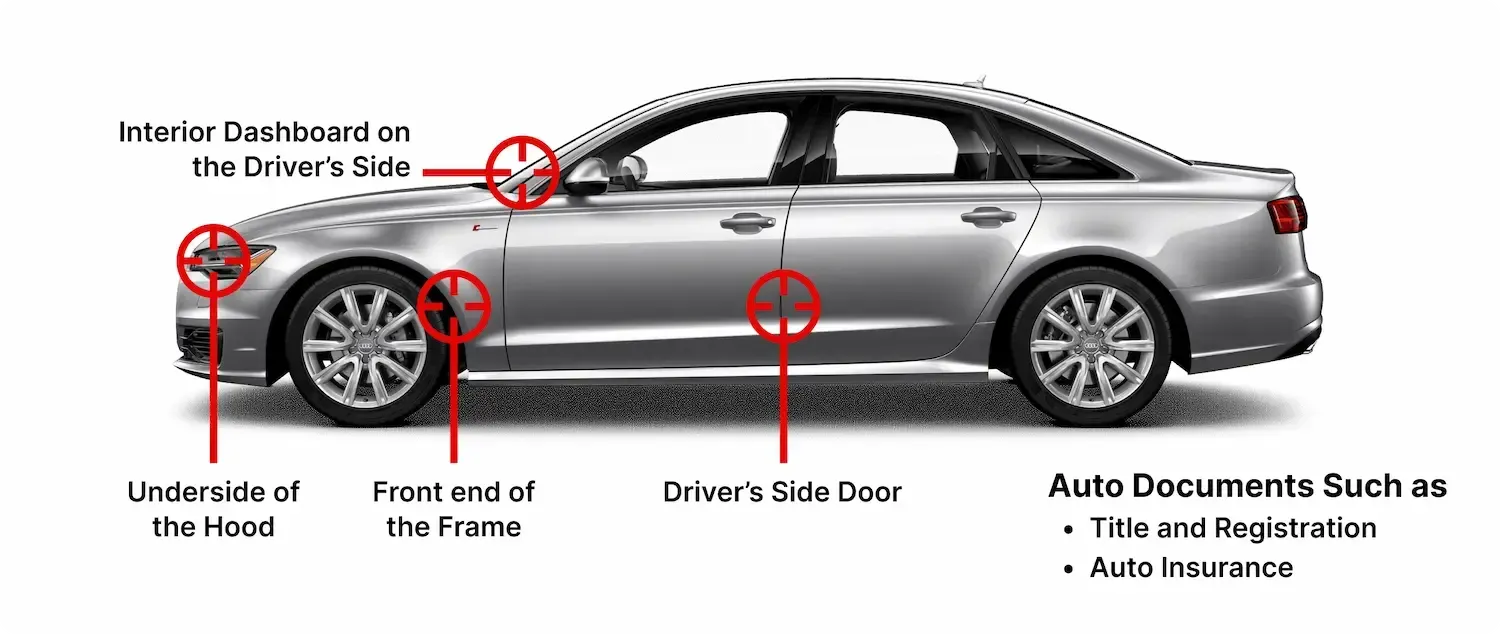
Mitsubishi VIN Location
The VIN can be found in several key areas on the vehicle and in official documents. Check these common spots to ensure you’re using the correct number:
Driver’s Side Dashboard
Look through the windshield at the lower corner of the dashboard on the driver’s side. This is the most common VIN location on modern Mitsubishi vehicles.
Driver’s Side Door Jamb
Open the driver’s door and inspect the door frame or pillar near the latch. You’ll usually find a label or metal plate displaying the VIN along with manufacturing details.
Engine Bay
Check inside the engine compartment, often near the firewall or chassis frame. Some Mitsubishi models have the VIN stamped directly onto structural components.
Documents
The VIN is also listed on official paperwork such as registration documents, insurance cards, and the vehicle title. Always cross-check these with the VIN on the vehicle.
Classic Mitsubishi VIN Location
Classic Mitsubishi vehicles, particularly those produced before VIN standardisation, may not follow modern placement rules. Identification numbers can sometimes appear in less obvious areas.
Under the Hood
On many older Mitsubishi models, the VIN or chassis number is often found on a plate mounted inside the engine bay, typically on the firewall or inner fender.
Body Panels
Some classic Mitsubishi vehicles may have identification tags on panels such as the hood, trunk lid, or body structure. These were commonly used for factory tracking and assembly identification.
Who Should Use the Mitsubishi VIN Decoder
A Mitsubishi VIN decoder is valuable for anyone buying, selling, or evaluating a Mitsubishi. Whether it’s a practical daily car, a performance-focused model like the Lancer Evolution, or a classic project, decoding the VIN helps confirm key details and avoid costly surprises.
Buyers
Check the Mitsubishi’s factory specifications, ownership history, and overall condition before purchasing. A VIN lookup helps confirm the vehicle matches the listing and uncovers details that may not be obvious at first glance.
Sellers
Provide accurate, verified information in your listing. Decoding the VIN confirms original specs and available records, making your listing more credible and appealing to serious buyers.
Dealers
Dealers can use VIN decoding to quickly verify inventory and maintain accurate listings. This is especially important for Mitsubishi vehicles, where trims, engines, and drivetrain options (FWD, AWD) can vary widely by market and model year.
Enthusiasts
Mitsubishi enthusiasts can use VIN decoding to understand their car’s original setup, including engine type, trim, and factory features. This is particularly useful for restoration projects or tuning builds.
What is the Difference Between a Modern and Classic Mitsubishi VIN
The difference between modern and classic Mitsubishi VINs comes down to structure, consistency, and the amount of information they provide. Newer models follow a global standard, while older vehicles use simpler, less uniform identifiers.
VIN Length and Format
Modern Mitsubishi vehicles use the standardized 17-character VIN introduced in 1981, following a consistent global format. Classic Mitsubishi models, especially those built before 1981, may have VINs ranging from 5 to 14 characters due to the lack of standardisation at the time.
Data Availability
Modern Mitsubishi VINs can reveal detailed information, including engine type (such as MIVEC engines), trim level, production details, and factory specifications. Classic VINs may return more limited data, but they can still confirm key identifiers like model and origin.
Decoding Accuracy
Decoding modern Mitsubishi VINs is generally reliable thanks to standardized formatting and complete databases. Classic VINs can be more challenging due to inconsistent formats and limited records, but a proper decoding tool can still provide useful insights.
Decoding Mitsubishi’s VIN
A 17-digit Mitsubishi VIN follows a structured format that reveals essential vehicle information. It is divided into three main sections: WMI (World Manufacturer Identifier), VDS (Vehicle Descriptor Section), and VIS (Vehicle Identifier Section).
World Manufacturer Identifier (WMI)
Digit 1 to 3: JA4
- J = Country of origin (Japan)
- A4 = Mitsubishi
Vehicle Descriptor Section (VDS)
Digit 4 to 9: AR3AU0
- A = Model line (Outlander Sport / RVR platform)
- R = Engine type (2.0L inline-4 engine)
- 3 = Body style (5-door SUV)
- A = Drivetrain (All-Wheel Drive system)
- U = Trim level (mid-range configuration)
- 0 = Check digit
Vehicle Identifier Section (VIS)
Digit 10 to 17: LU021077
- L = Model year (2020)
- U = Assembly plant in Okazaki Plant, Aichi, Japan
- 021077 = Serial number
Need More Information? Get a Mitsubishi Vehicle History Report
A VIN decoder gives you the basics, but a full history report shows the complete picture. For a Mitsubishi, this extra insight matters, especially for used or imported vehicles, so you can understand how it’s been driven, maintained, and whether it’s worth the investment.
Vehicle Specification
See how the Mitsubishi was built from the factory. This includes engine type (such as MIVEC inline-4 or turbocharged setups), transmission, trim level, drivetrain (FWD or AWD), production plant, and original MSRP.
Title Records
Review the title history to identify anything that could impact value or legality. Flags like salvage status, rebuilt titles, theft records, or mileage inconsistencies are critical checks when evaluating a used Mitsubishi.
Odometer Reading
Mileage reveals how the vehicle has been used over time. This section shows recorded readings with dates, helping you spot rollbacks or unusual gaps that may indicate potential issues.
Accident and Damage History
Check for reported accidents, structural damage, or environmental exposure such as flooding. Even minor damage can affect a Mitsubishi’s reliability and long-term performance, so this insight helps you avoid hidden risks.
Auction History
If the Mitsubishi has been through an auction, you’ll find those records here. Details include sale dates, locations, prices, and even photos showing the vehicle’s condition at the time of auction.
Ownership Information
Understand how the vehicle has changed hands over time. You’ll see the number of owners, past registered locations, and ownership duration–helping you assess how consistently the car has been maintained.
Recalls Check
Stay updated on any recalls linked to the vehicle. This section shows the issue, recall date, and whether it has been resolved—helping ensure the Mitsubishi remains safe and roadworthy.
Engine Information
Review the engine setup tied to the VIN in one report. Modern Mitsubishi models typically feature efficient MIVEC inline-4 engines or turbocharged variants, while classic models often use durable, naturally aspirated engines known for simplicity and long-term reliability.
Decode More Mitsubishi Information with Our Tools
Need more details or the original window sticker for a Mitsubishi? Use our dedicated Mitsubishi tools to get accurate results quickly and make informed decisions before buying or selling.
Mitsubishi Recall Check by VIN
Check the recall history of any Mitsubishi using the VIN. Make sure all recall issues have been properly addressed and closed to ensure the vehicle is safe and road-ready.
Mitsubishi Window Sticker by VIN
Access the original Mitsubishi window sticker by VIN to view factory-installed features, options, colors, MSRP, and more. It’s one of the easiest ways to confirm how the vehicle was originally built.
Decode Any Modern and Classic Mitsubishi Model by VIN
Planning to buy a used Mitsubishi? Don’t rely on listings or a quick test drive alone. Decode the VIN first to confirm specifications, verify condition, and ensure everything matches what’s being advertised.
Supported Modern Mitsubishi Models
Decode VINs for a wide range of modern Mitsubishi vehicles, including models like the Outlander, Eclipse Cross, ASX, L200, and more. Make sure you’re getting the right features, engine, and overall value before committing.
Supported Classic Mitsubishi
Not only modern models, but our Mitsubishi VIN Decoder can decode any classic VIN that has a 5 to 14-digit format.
Decode Any Vehicle’s VIN
Checking more than one car? You’re not limited to a single brand. Our VIN decoder works across a wide range of manufacturers, so you can compare vehicles, verify specs, and review history records.
Recent Update on Mitsubishi EV
The Mitsubishi electrification strategy in the United States focuses primarily on plug-in hybrid technology rather than a dedicated battery-electric vehicle lineup. While the brand has a long history with electric vehicles, its present U.S. electrified offering is centered around the Outlander PHEV.
Electrified Lineup
The Outlander PHEV serves as Mitsubishi's flagship electrified vehicle in the U.S. market, combining electric-only driving capability with a gasoline engine for extended range and everyday practicality.
Outlander PHEV is Mitsubishi's primary electrified model.
Electric-only driving for shorter trips.
Gasoline engine support for longer journeys.
Focus on efficiency and versatility.
Mitsubishi's EV Heritage
Although Mitsubishi's lineup emphasizes plug-in hybrids, the company has played an important role in EV development. The brand introduced the i-MiEV, one of the earliest mass-produced electric vehicles available to consumers.
FAQs About Mitsubishi VIN Decoder
How do I decode my Mitsubishi VIN?
To decode a Mitsubishi VIN, locate the 17-character code on the dashboard or driver’s side door jamb. You can use a VIN decoder, or break it down manually—WMI (1–3), vehicle specs (4–8), model year (10), and assembly plant (11).
How do I tell where my Mitsubishi was made?
To identify where your Mitsubishi was built, check the VIN. The first character shows the country of origin (e.g., “J” for Japan, “4” for the USA), while other digits provide plant and production details.
How do I find out what trim my Mitsubishi is?
To find your Mitsubishi’s trim level, use a trusted VIN decoder like Detailed Vehicle History. You can also check the driver’s door jamb sticker, registration documents, or contact a Mitsubishi dealer for accurate specifications.
Where do I locate my classic Mini VIN number?
Classic Mini VINs (chassis numbers) are usually found on a plate attached to the inner wing, firewall, or scuttle panel. On some models, they may also appear under the bonnet or in the boot area, depending on the production year.
Can a Classic Mini VIN tell me the production year?
Yes, a classic Mini VIN can often indicate the production year, but the method depends on the model. Cars from 1980 onward use a standard format, while earlier models require decoding specific chassis codes.
Is the classic Mini VIN unique?
Yes, a classic Mini VIN or chassis number is unique to each vehicle. However, pre-1981 models use non-standard formats, often appearing as shorter codes stamped on the body or displayed on a chassis plate.