



Mercedes Build Sheet by VIN: Original Vehicle Details
A Mercedes build sheet by VIN shows how a vehicle was configured at the factory, before ownership changes, aftermarket parts, or assumptions entered the picture. Verify trims, options, factory specifications, pricing, and more with a build sheet.
What Is a Mercedes Build Sheet?
A Mercedes build sheet is a factory record that shows how a specific vehicle was originally built. It reflects the configuration set during production, before any changes from ownership, repairs, or upgrades.
Linked directly to the VIN, the build sheet confirms the original model, mechanical setup, and equipment level as intended by Mercedes. It provides a reliable reference for understanding what the car started life as, without relying on assumptions or listings.
What’s in a Mercedes-Benz Build Sheet?
A Mercedes-Benz build sheet by VIN provides the vehicle’s original details, helping you understand its factory specifications. Here’s what you can learn:
Core Vehicle Information
This section defines the vehicle at its most basic level, using manufacturer records.
Official model and designation
Identifies the exact Mercedes model and trim as produced, avoiding confusion caused by badges or seller descriptions.
Production year and build range
Shows the model year and approximate production period, which can explain feature changes or mid-year updates.
Body configuration and drivetrain
Clarifies whether the vehicle was built as a sedan, coupe, SUV, or wagon, along with how power is delivered.
Factory transmission type
Confirms the transmission installed during production, which is important when checking originality or service compatibility.
Engine and Driveline Details
This section focuses on the mechanical components that define performance and driving character.
Engine identification code
Lists the specific Mercedes engine code, helping distinguish between similar engines across different trims.
Engine size and layout
Shows displacement and configuration, which matter for performance expectations and maintenance planning.
Fuel specification
Displays the fuel type specified by the manufacturer at production, especially helpful for older models.
Transmission matching
Explains which transmission was originally paired with the engine, helping spot swaps or incorrect replacements.
Drive system layout
Confirms whether the vehicle left the factory as rear-wheel drive, all-wheel drive, or another setup.
Standard Equipment Overview
Standard equipment shows what was included on every vehicle of that trim when new.
Factory safety systems
Lists safety equipment available at production, helping buyers understand original protection levels.
Interior baseline features
Outlines standard cabin features such as seating, controls, and comfort elements included by default.
Exterior baseline features
Details exterior components that were factory-installed, useful for spotting missing or altered parts.
Original technology features
Shows the technology level available at the time, setting realistic expectations for older systems.
Optional Equipment and Packages
This section explains what the original buyer selected beyond the base configuration.
Factory option packages
Displays bundled options chosen at purchase, often explaining large pricing differences between similar cars.
Performance-related upgrades
Shows factory performance enhancements that affect handling, output, or long-term desirability.
Exterior appearance options
Details cosmetic upgrades such as wheels, trim finishes, or styling elements selected during production.
Interior comfort upgrades
Lists optional interior features that improved comfort, materials, or cabin presentation.
Interior and Exterior Color Details
Color information plays a major role in originality and restoration accuracy.
Original exterior paint
Confirms the factory paint color applied at production, useful for repaint verification.
Interior color and trim
Shows the original interior color and upholstery type used by the factory.
Manufacturer color codes
Provides official color codes when available, making sourcing and matching easier.
Wheels, Tires, and Suspension Information
Color information plays a major role in originality and restoration accuracy.
Original exterior paint
Confirms the factory paint color applied at production, useful for repaint verification.
Interior color and trim
Shows the original interior color and upholstery type used by the factory.
Manufacturer color codes
Provides official color codes when available, making sourcing and matching easier.
Original Pricing Breakdown
This section explains how the vehicle was priced when it was new.
Base vehicle price
Shows the starting MSRP before options or additional charges were applied.
Cost of selected options
Breaks down pricing for factory options and packages chosen by the original buyer.
Delivery and destination fees
Lists factory delivery charges included in the original transaction.
Total original MSRP
Combines all pricing elements to show what the Mercedes originally cost when sold new.
Warranty Coverage at Sale
This section outlines the warranty protection that applied when the vehicle left the dealership.
Basic vehicle coverage
Covered non-wear components for a limited time against manufacturing defects.
Powertrain coverage
Extended protection for major mechanical components during early ownership.
Corrosion protection
Provided coverage against rust-through caused by factory defects.
Emissions compliance coverage
Covered emissions-related components to meet regulatory requirements at the time.
Fuel Economy Information
Fuel economy figures show how the vehicle performed during official testing.
City fuel efficiency
Represents expected consumption during stop-and-go driving conditions.
Highway fuel efficiency
Shows estimated fuel usage during steady-speed highway driving.
Combined fuel estimate
Provides an average figure blending city and highway results.
Recommended fuel grade
Specifies the fuel type required by the manufacturer to avoid engine issues.
Where is the VIN on a Mercedes-Benz?
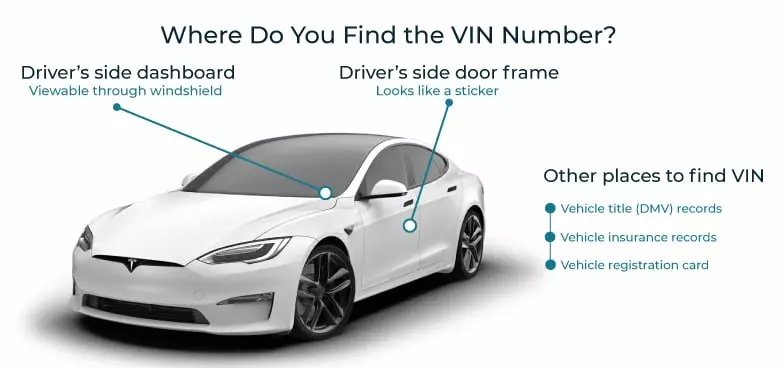
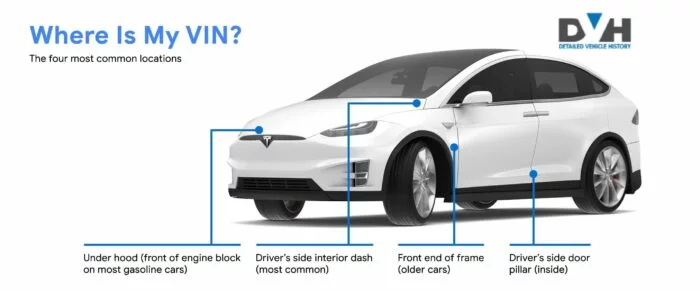
The VIN (Vehicle Identification Number) is like your car’s fingerprint, a unique code that provides a wealth of information about your Mercedes-Benz. Here’s where you can find it:
- Dashboard: Look at the bottom corner of the windshield on the driver’s side.
- Driver’s Door Frame: Check the door jamb or near the latch.
- Engine Bay: You might find the VIN stamped near the engine block.
- Trunk or Rear Frame: Look inside the trunk or under the spare tire compartment.
- Vehicle Documents: Look for the VIN on the registration, insurance card, owner’s manual, and title.
How to Get a Mercedes Benz Build Sheet by VIN?
Obtaining a copy of the official Mercedes-Benz VIN decoder build sheet takes less than a minute. Simply follow these steps:
Step 1: Find Your VIN
Locate the 17-digit VIN on the car or in vehicle documents. You can also get the build sheet by entering the license plate or the year, make, and model.
Step 2: Enter the VIN
Enter the VIN in the form above and click “Search VIN” to process your request.
Step 3: Get Detailed Information
Access the detailed build sheet and download it as a PDF for future reference.

Run a Mercedes Benz VIN Check Before Buying
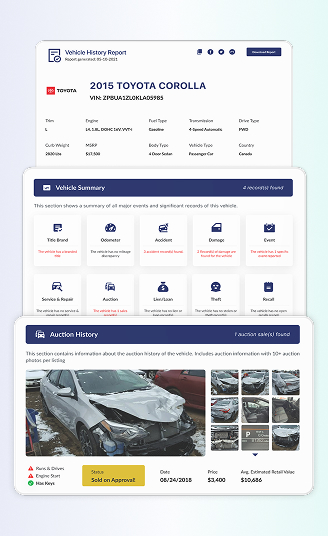
Before buying a used Mercedes Benz, it’s smart to know the full history and condition. Our Mercedes VIN decoder gives detailed history, helping you avoid stolen cars or hidden issues with accurate, trusted reports that include:
- Title records
- Ownership history
- Service record by VIN
- Theft records
- And more
Build Sheet Lookup for Popular Mercedes Models
Our tool works with a wide range of Mercedes-Benz models. Here are some popular ones:
- C-Class
- E-Class
- S-Class
- A-Class
- CLA
- CLS
- GLA
- GLB
- GLC
- GLE
- GLS
- G-Class
Build Sheet Lookup for Other Makes
If you’re looking for a build sheet for another car brand, we provide support for all makes, including the following popular ones:
FAQ About Mercedes Benz Build Sheet by VIN
How do I get a Mercedes-Benz spec sheet?
To get this Mercedes-Benz spec sheet, all you need to do is enter the Mercedes VIN number, associated US license plate, or even the year, make, and model into the form on this page. This will reveal detailed car specifications, features, options, safety ratings, and more.
Can you look up a window sticker by VIN?
Yes, enter the VIN into our search tool to access a car window sticker by VIN, providing you with information on the vehicle’s original MSRP, standard and optional equipment, fuel efficiency, and more.
How do I decode a Mercedes-Benz VIN number?
Simply enter the VIN into our Mercedes-Benz VIN decoder tool to confirm the vehicle’s original specs, features, safety rating, warranty information, and more.