Window Sticker vs. VIN Decoder: Two Tools, Two Different Jobs
Key Takeaways
A VIN decoder shows all vehicle specifications tied to a specific VIN.
A window sticker shows the vehicle's original factory configuration and pricing.
- VIN decoders are typically used as a quick first step when researching a vehicle.
- Window stickers provide a more complete picture of factory-installed options and packages.
If you're looking for a used car, trying to sell one, or just wanting to learn more about the car you already own, you've probably come across both window stickers vs. VIN decoders. These are two tools that show up a lot in the world of used cars, & far too often people get confused about what they do.
Lots of people think that these tools do the same thing, but the truth is, they do not.
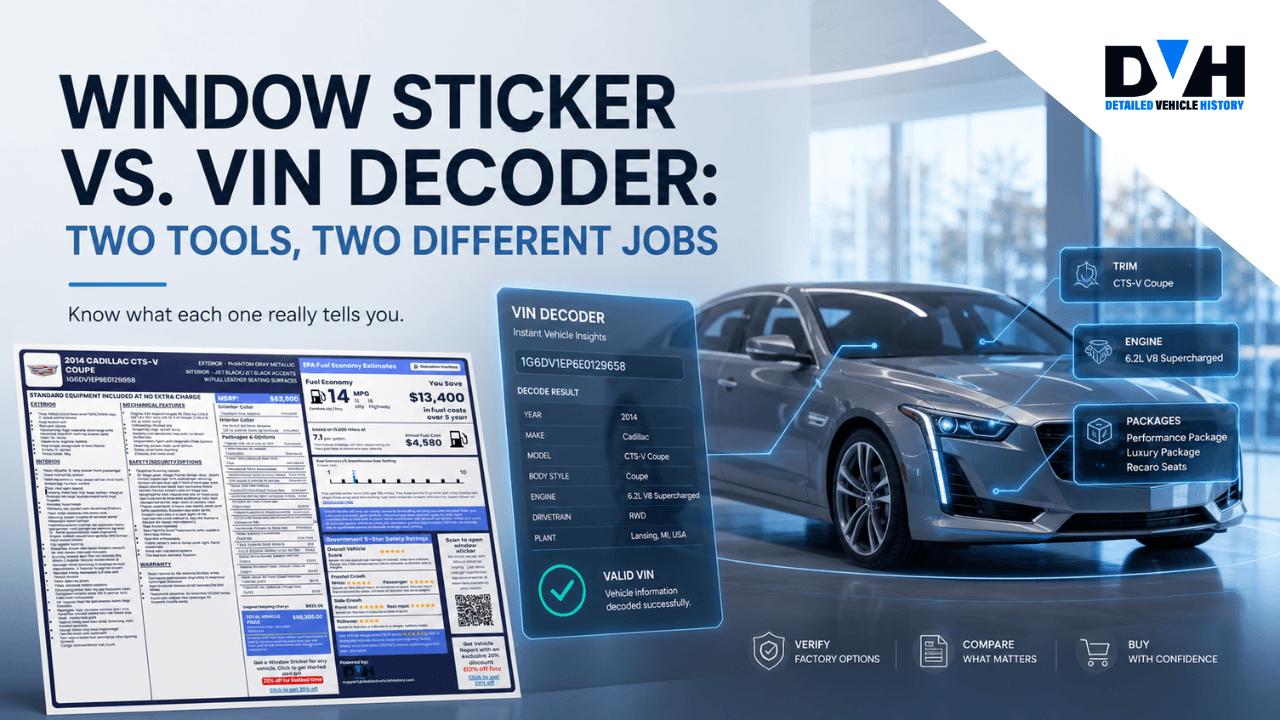
A VIN decoder and a window sticker both look up a car's VIN, but whereas a VIN decoder gives you the lowdown on what the car is & what make & model it is, plus all sorts of other details like the engine and transmission, a window sticker gets into the nitty-gritty of the car's original factory configuration.
It shows you all the options, packages and MSRP, as well as exactly how the car was specced when it was first sold & what the original fuel economy ratings were.
Some people seem to think you either use one or the other. Not us - we think it's a good idea to use both tools together. One helps confirm what on earth the car is, while the other shows you exactly how it was specced from the factory - with all the original options & features included.
What Happens When You Decode a VIN?
A VIN decoder is a tool that translates a Vehicle Identification Number (VIN) into useful vehicle information.
Every passenger vehicle built for sale in the United States since the 1981 model year has a standardized 17-character VIN. That VIN is not just a random sequence of letters and numbers. It contains information about the manufacturer, vehicle type, engine, model year, assembly plant, and other characteristics.
When you enter a VIN into a VIN decoder, the tool reads the data associated with that specific VIN and displays vehicle specifications within seconds.
A VIN decoder can help you identify:
Basic Vehicle Information
- Year
- Make
- Model
- Trim
- Body style
- Country of manufacture
This information is often used to verify whether a vehicle listing is accurate.
Engine and Powertrain Specifications
Many VIN decoders can disclose:
- Engine size
- Engine configuration
- Fuel type
- Transmission type
- Drive type
- Hybrid or electric vehicle details
This makes it easier to compare vehicles or confirm a seller's claims.
READ ALSO: How To Check If A VIN Number Is Correct (Complete Guide)
Vehicle Dimensions and Capacities
Depending on the vehicle, a VIN decoder also provides:
- Wheelbase
- Length and width
- Seating capacity
- Cargo volume
- Curb weight
- Fuel tank capacity
These details can be useful when comparing different models.
Safety and Compliance Information
A VIN decoder may also display:
- Airbag information
- Seat belt systems
- Brake systems
- Vehicle classification
- Emissions data
This information comes directly from manufacturer and regulatory records associated with the VIN.
Why Should You Use a VIN Decoder?
A VIN decoder is usually the fastest way to verify a vehicle's identity.
If a seller claims a vehicle has a certain engine or trim level, a VIN decoder can help confirm whether those details match the vehicle's official records.
For buyers, it serves as a quick screening tool before spending additional time researching the vehicle.
And What About a Window Sticker?
A window sticker serves a completely different purpose.
When a new vehicle is brought to a dealership, brand new from the factory, it always comes with a sticker attached to the window. This sticker contains information about the vehicle's equipment, pricing, fuel economy, and other details buyers need before making a purchase.
You may know it as a Monroney label. Now, here's the problem. More often than not, the window sticker disappears over time. Sometimes, they get lost or thrown away, and sometimes they are just chilling in a filing cabinet and no one knows where they are.
For this reason, many vehicle owners (and buyers) have to get window sticker lookups the VIN. That's why services such as Detailed Vehicle History are available.
Unlike a VIN decoder, a window sticker focuses on the vehicle's original factory configuration.
READ ALSO: How to Read a Car Window Sticker [Ultimate Guide]
A window sticker typically includes:
Factory-Installed Options
One of the biggest advantages of a window sticker is the detailed list of factory options.
This may include:
- Premium audio systems
- Technology packages
- Tow packages
- Performance upgrades
- Premium wheels
- Leather seating packages
- Driver assistance features
These options are shown for the specific vehicle associated with the VIN.
Original MSRP Breakdown
A window sticker shows how the original selling price was calculated.
This often includes:
- Base MSRP
- Optional equipment pricing
- Destination charges
- Total MSRP
For buyers and sellers, this information can provide valuable context when evaluating a vehicle's value today.
Fuel Economy Information
Window stickers include EPA fuel economy ratings that were assigned to the vehicle when it was new.
Depending on the vehicle, you may see:
- City MPG
- Highway MPG
- Combined MPG
- Estimated annual fuel costs
Warranty Information and Standard Equipment
Many window stickers also display:
- Safety ratings
- Warranty coverage
- Standard equipment
- Environmental information
This helps provide a complete snapshot of the vehicle as it appeared on the dealership lot.
Why Use a Window Sticker?
Getting a window sticker by VIN is useful when you want to know exactly how a vehicle left the factory.
Two vehicles may look identical on the outside, but one could have thousands of dollars in additional factory options.
The window sticker helps to highlight those differences.
READ ALSO: How to Find the Original Window Sticker by VIN
Window Sticker vs. VIN Decoder: Side-by-Side Comparison
For better clarity, here's a side-by-side comparison of our free VIN decoder vs. window sticker:
| Information & Features | VIN Decoder | Window Sticker Lookup |
|---|---|---|
| Year, Make & Model Verification | ✓ | ✓ |
| Trim Identification | ✓ | ✓ |
| Engine & Transmission Specs | ✓ | ✓ |
| Drivetrain Information | ✓ | ✓ |
| Vehicle Dimensions & Capacities | ✓ | ✓ |
| Safety Equipment Details | ✓ | ✓ |
| Original MSRP | ✓ Available | ✓ Full Breakdown |
| Factory-Installed Options | ⚠️ Limited | ✓ Complete List |
| Option Package Pricing | ✘ No | ✓ Included |
| Base Vehicle Price | ✘ No | ✓ Included |
| Destination Charges | ✘ No | ✓ Included |
| Fuel Economy Ratings | ⚠️ Limited | ✓ Official EPA Ratings |
| Standard Equipment List | ✘ No | ✓ Included |
| Warranty Information | ✘ No | ✓ Included |
| Exterior & Interior Colors | ✘ No | ✓ Included |
| Vehicle Classification | ✓ Included | ✘ No |
| Best For | Verifying vehicle identity and specifications | Verifying original equipment, options, and pricing |
What Each Tool Is Best For
While both tools provide valuable information, they are often used at different stages of the research process.
Use a Free VIN Decoder When You Want To:
- Verify a vehicle listing
- Confirm engine and drivetrain specifications
- Check trim information
- Compare technical specifications
- Research a vehicle quickly
Get a Window Sticker by VIN When You Want To:
- Verify factory options
- See package information
- View the original MSRP
- Compare equipment between similar vehicles
- Document original vehicle features for resale
In many cases, the best approach is to use both. A VIN decoder gives you the technical foundation, while a window sticker fills in the factory-option details that specifications alone may not show.
Window Sticker vs VIN Decoder: Using Both Tools Together
The smartest way to research a vehicle is to use both tools as part of the same process. Each tool fills in information the other may not emphasize.
Step 1: Decode the VIN
Start by entering the VIN into a VIN decoder.
This helps verify:
- Year
- Make
- Model
- Trim
- Engine
- Drivetrain
- Body style
If any of these details differ from the seller's description, it may be worth asking questions before moving forward.
Step 2: Review the Vehicle Specifications
Check the decoded specifications carefully. With Detailed Vehicle History, you can decode as many VINs as you want for free!
Look for details that matter to your purchase decision, such as:
- Towing capacity
- Engine size
- Fuel type
- Seating capacity
- Cargo space
This helps determine whether the vehicle meets your needs.
Step 3: Retrieve the Window Sticker
Next, obtain the vehicle's window sticker.
This shows:
- Factory-installed options
- Optional packages
- MSRP breakdown
- Fuel economy ratings
- Warranty information
- Standard equipment
At this stage, you'll have a much better understanding of what the vehicle originally included.
Step 4: Compare the Information
Review the seller's description alongside both reports.
Questions to ask include:
- Are all advertised features actually factory-installed?
- Does the trim level match the decoded VIN data?
- Is the asking price reasonable based on the original equipment?
This simple comparison can help identify inaccuracies before money changes hands.
Step 5: Check Vehicle History
Neither a VIN decoder nor a window sticker tells the complete ownership story. If you want to take it a step further, you can get a vehicle history report.
This helps to check for:
- Accident records
- Title issues
- Salvage branding
- Theft records
- Odometer discrepancies
- Ownership history
When combined, these tools provide one of the most complete pictures available for a used vehicle.
Conclusion on Window Sticker vs. VIN Decoder
A VIN decoder and a window sticker may use the same VIN, but they serve different purposes.
A VIN decoder is often the best place to start because it quickly confirms a vehicle's identity and specifications. A window sticker takes the research further by showing the original factory configuration, option packages, MSRP breakdown, fuel economy ratings, and other details that helped define the vehicle when it was new.
For buyers, sellers, dealers, and enthusiasts, using both tools together provides a clearer understanding of any vehicle. One tells you what the vehicle is. The other tells you exactly how it was built.
When combined with a vehicle history report, you can make more informed decisions and reduce the risk of surprises later on.
FAQ About Window Sticker vs VIN Decoder
What's the difference between a VIN decoder and a window sticker?
A VIN decoder identifies a vehicle and shows technical specifications such as the engine, drivetrain, body style, and trim. A window sticker shows the vehicle's original factory equipment, option packages, pricing, fuel economy ratings, and warranty information.
Is a VIN decoder free?
Yes, a VIN decoder is free, especially ours. Many VIN decoders are available at no cost and provide basic vehicle specifications. Additional services such as vehicle history reports and window stickers are usually not free but available at a small cost.
Can a VIN decoder show factory options?
No, a VIN decoder does not show factory options. It could show some trim-related features and specifications, but it generally does not provide the same level of detail as a window sticker. For a complete list of factory-installed options and package pricing, a window sticker is usually the better choice.
Do I need both a VIN decoder and a window sticker?
Using both tools gives you the most complete picture. A VIN decoder confirms the vehicle's identity and specifications, while a window sticker shows exactly how the vehicle was equipped when it left the factory.
How accurate is a VIN decoder?
Very accurate. A VIN decoder uses information tied directly to the VIN and manufacturer records. For core vehicle details such as year, make, model, engine, and trim, the information is generally very reliable.
What information can a VIN decoder provide?
Depending on the vehicle, a VIN decoder may provide information about:
- Year
- Make
- Model
- Trim
- Engine
- Transmission
- Fuel type
- Drive type
- Dimensions
- Safety systems
- MSRP, and more.
Can I decode a classic car VIN?
Yes, our VIN decoder decodes both classic VINs with 5 to 14 characters alongside modern ones with 17 characters.

About Joses Peter
131 articles published
Joses Peter is a seasoned writer with a portfolio of 100+ blog posts and two published papers. Currently, she contributes as a professional writer in the automotive industry, with a great passion for technology and automobiles. This passion keeps her constantly learning and translating complex tech concepts into accessible content.