How to Verify Factory Options Using a Window Sticker
Key Takeaways
- A window sticker clearly shows the original factory equipment and pricing and can help you accurately verify factory options.
- If the window sticker is missing, a window sticker lookup by VIN can bring up a digital copy.
- The trim level, option packages, equipment list, and MSRP breakdown are the main parts to check.
- You cannot find dealer-installed extras and options on the factory window sticker.
- VIN mismatches, missing packages, and surprise upgrades are worth a closer look.
A window sticker can tell you a lot about a vehicle. More than most people realize, actually.
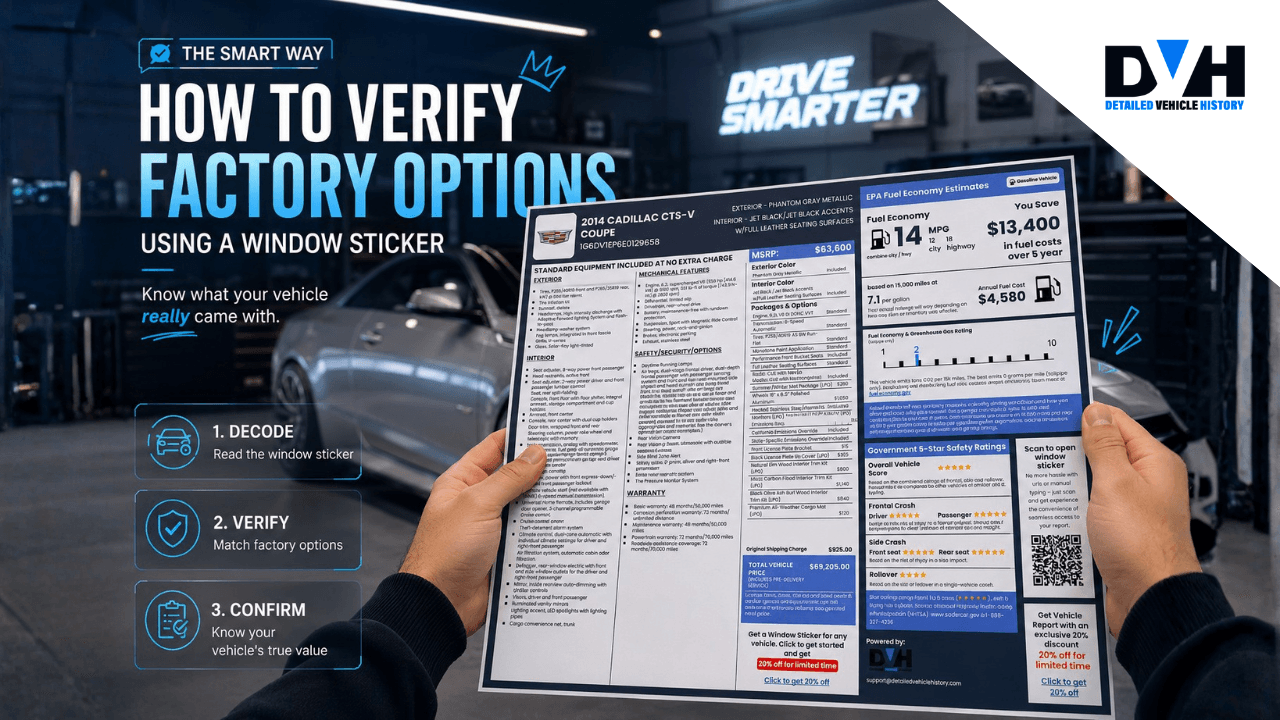
To verify factory options by VIN, you need to first locate the original Monroney label or retrieve a digital window sticker, then compare every listed package, feature, and option on the label against the actual vehicle.
With this simple step, you can be sure of exactly what came from the factory and what didn't and easily spot lies or exaggerations from the dealer. Buying, selling, and double-checking a listing; it all starts making more sense once you have that sticker in front of you.
Why Buyers Still Use Window Stickers Years Later
Most people think a window sticker only matters when a vehicle is sitting on a dealership lot. In reality, it often becomes even more useful years later.
Once a vehicle changes hands a few times, details can get lost. Sellers may not know which options were included from the factory, leading to a lot of errors. A window sticker clears this all up.
It shows exactly how the vehicle was configured when it left the factory, making it one of the easiest ways to verify original equipment, compare trim levels, and confirm package contents.
What Factory Options Show Up on a Window Sticker?
A window sticker is not just a plain list of features. It tells you how the vehicle was built, what was added, and how the price was put together.
Once you know where to look, it becomes much easier to spot gaps and oddities.
Trim Level and Model Information
The first thing to check is the basic identity of the vehicle.
The sticker shows the model year, trim level, and body style. That gives you the foundation for everything else on the page.
This part matters because many options depend on the trim. A car that is claimed to be a top-tier model should show that on the sticker. If the sticker says otherwise, something is off.
Factory Option Packages
Manufacturers often bundle popular features into packages.
Common ones include:
- Technology packages
- Driver-assistance packages
- Premium audio packages
- Sport packages
- Luxury packages
- Tow packages
The sticker usually lists these by name and explains what they include.
It also shows the cost of each package. That is useful because it confirms the upgrade was part of the original build, not something someone added later and called “factory.”
Standalone Factory Options
Some features are not grouped into packages at all.
These can include:
- Power sunroof
- Heated steering wheel
- Ventilated seats
- Premium wheels
- Upgraded suspension
- Wireless charging
These usually appear in the optional equipment section.
So if the sticker says the car left the factory with a panoramic roof and the vehicle in front of you clearly does not have one, that is a red flag. Simple as that.
READ ALSO: How to Find the Original Window Sticker by VIN
Exterior and Interior Colors
The sticker also shows the original paint color and interior color. That may sound like a small detail, but it can tell you plenty.
If the sticker says black leather and the car now has tan seats, the interior was likely changed at some point. Same with paint. A color mismatch can point to bodywork, repainting, or other changes over the years.
It’s not always a problem, just something to notice.
Powertrain Details
You will also see mechanical information, including:
- Engine type
- Engine size
- Transmission
- Drivetrain
- Hybrid or electric system details
This part is especially handy when checking performance models or AWD claims.
A seller may say the vehicle is all-wheel drive, but the sticker might show that it was originally built as front-wheel drive. That kind of mismatch matters.
Standard Equipment
Every trim comes with a base set of features.
The sticker lists these standard items, which may include:
- Safety systems
- Infotainment features
- Seat material
- Climate control
- Wheel style
- Exterior design details
Knowing what comes standard helps you avoid confusion. Sometimes people list standard features as though they were upgrades. Happens all the time.
MSRP Breakdown
One of the most useful parts of the sticker is the pricing section.
This usually includes:
- Base MSRP
- Optional equipment pricing
- Destination charge
- Total vehicle price
That breakdown helps you see what the vehicle cost when it was new. It also gives you a sense of whether the current asking price makes sense based on the options it actually has.
EPA Fuel Economy Ratings
The sticker includes official fuel economy estimates for city and highway driving.
These numbers do not verify every option on their own, but they can help confirm the vehicle’s engine and drivetrain match the factory setup.
If the numbers do not fit the supposed configuration, that is worth checking.
Safety Features and Ratings
Many window stickers also show safety information such as:
- Airbag systems
- Driver-assistance features
- Safety packages
- Crash-test details
This is another good way to confirm whether certain advanced features were built in from the start.
Warranty Information
The original factory warranty details are often listed too.
Even if the warranty has expired by now, it still gives you a better picture of how the car was sold new.
Assembly and Manufacturing Details
You may also see things like the following:
- Assembly plant location
- Country of origin
- Domestic and imported parts percentages
Collectors tend to pay attention to this stuff. So do people who care about originality and build history.
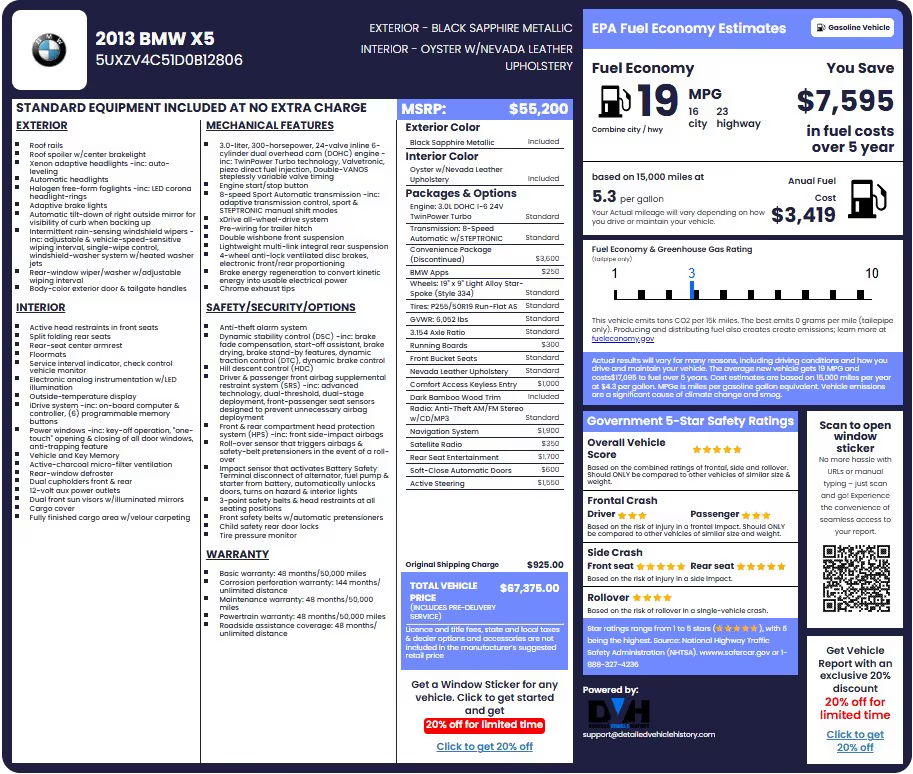
Here’s what a window sticker looks like:
READ ALSO: How to Read a Car Window Sticker [Ultimate Guide]
How to Verify Factory Options Step by Step
Verifying factory options should be relatively easy. It’s just a matter of comparing what the manufacturer says your vehicle came with (on the window sticker) against what you actually see on the car.
Get Your Hands on the Window Sticker
Start by tracking down the original window sticker. If the sticker has gone missing, you can use our online window sticker lookup service, which gives you a digital copy based on the vehicle's VIN. Make certain you get the Monroney label direct from the manufacturer and not some dealer add-on.
Make Sure the VINs Match
Before you even start looking at options, double-check that the VIN on the sticker matches the VIN on the vehicle. You can find it in a few places, notably on the dashboard plate, the driver's door jamb, and the engine bay (if you're dealing with a car that has one). If the numbers don't match, stop what you're doing and dig a bit deeper with a vehicle history report.
Confirm the Trim Level
Next up, confirm the model year, trim level, and body style listed on the sticker. This is important because lots of features come standard with certain trims but not others - a car sold as a higher trim should match the trim shown on the sticker.
Go Through Each Option Package
Walk through each package listed on the window sticker and make sure the corresponding features are on the car.
For example:
- A tow package should have some basic towing gear.
- A premium audio package should have an upgraded sound system.
- A technology package should have the driver-assistance features listed.
If you spot a package on the sticker that's missing the equipment it should have, ask some questions.
Check for Option Codes
Some manufacturers assign special codes to their factory options and packages. If you're working on a luxury, performance, or collector's item, compare those option codes with the manufacturer's official documentation to make sure the gear is genuine and properly installed.
Check the Paint & Interior
The window sticker will also show you the vehicle's original paint and interior colors. Double-check these details against the actual car you're looking at. Any major discrepancies could indicate that the car's been repainted or had the interior redone at some point.
Compare the Sticker to What the Seller's Saying
Compare the window sticker to the car's advertisement.
Look out for any discrepancies when it comes to:
- Trim level
- Option packages
- Safety features
- Audio systems
- Towing equipment
- Driver-assistance tech
Any discrepancies are worth investigating before you proceed.
Look For a Dealer Addendum Sticker
Finally, make sure the vehicle doesn't have a dealer addendum sticker. This is a separate label that lists dealer-installed extras like window tint, paint protection, wheel locks, or fabric protection. These are not factory options and shouldn't be confused with the stuff listed on the original sticker.
Factory Options vs. Dealer-Installed Options: Know the Difference
This is one area that catches a lot of buyers out.
Just because a vehicle has a certain feature doesn't necessarily mean it came from the factory with it. Dealers often add accessories after a vehicle arrives on the lot, and those extras can sometimes get mistaken for factory equipment.
If you're trying to verify original options, it's important to know the difference.
What Are Factory Options?
Factory options are features that are installed before the vehicle leaves the factory.
They're part of the original build and will appear on the vehicle's window sticker. In most cases, they can also be verified using the VIN.
Common examples include:
- Premium audio systems
- Adaptive cruise control
- Tow packages
- Sport packages
- Panoramic sunroofs
- Performance upgrades
If it's listed on the Monroney label, it was part of the vehicle from day one.
What Are Dealer-Installed Options?
Dealer-installed options are added after the vehicle reaches the dealership. They're not part of the original factory build, even if they were installed before the first owner bought the vehicle.
Some of the more common dealer add-ons include:
- Paint protection packages
- Window tint
- Wheel locks
- Fabric protection
- Security systems
- Nitrogen-filled tyres
You'll usually find these items listed on a separate dealer addendum sticker rather than the official window sticker.
Why Does It Matter?
For most buyers, it comes down to value. Dealer-installed accessories often come with hefty markups, but they don't always add much when it's time to sell the vehicle.
Factory options tend to hold their value better because they're part of the original build. Take a premium audio package, for example. That's generally going to be worth more to future buyers than a dealer-applied paint protection package.
That's why it's worth knowing exactly what you're paying for.
Factory Options vs. Dealer Add-Ons
| Feature | Factory Option | Dealer-Installed |
|---|---|---|
| Listed on Monroney label? | ✓ Yes | ✘ No |
| Included in original MSRP? | ✓ Yes | Listed separately |
| Can be verified by VIN? | ✓ Yes | ✘ Usually not |
| Installed at the factory? | ✓ Yes | ✘ No |
| Impact on resale value | Generally higher | Generally lower |
| Example | Premium audio package | Fabric protection |
READ ALSO: How to Print a Window Sticker from VIN for Any Car
Common Red Flags When Verifying Factory Options
Most vehicle inspections go smoothly. Sometimes, though, you'll encounter details that deserve a closer look.
Watch for these warning signs.
- The VIN on the sticker doesn't match the VIN on the vehicle.
- The seller claims a premium package that's absent from the sticker.
- The option appears on the sticker, but the feature is missing from the vehicle.
- Interior color doesn't match factory specifications.
- Exterior paint doesn't match the factory color.
- The original sticker isn't available, and the seller refuses a VIN lookup.
- Dealer addendum pricing exceeds the value of the actual accessories.
- The advertised trim level doesn't match factory documentation.
One red flag doesn't automatically mean there's a problem.
Several red flags together should encourage deeper investigation.
Features That Are Commonly Misrepresented by Sellers
Some features create confusion more often than others. In many cases, vehicles look similar from the outside even though the underlying equipment differs significantly.
These are some of the most commonly misrepresented features in used-car listings.
| Claimed Feature | How to Verify on Sticker |
|---|---|
| Premium Audio System | Listed under optional equipment or package name |
| Navigation System | Appears within technology or navigation package |
| Tow Package | Check factory package and pricing |
| Adaptive Cruise Control | Driver-assistance package listing |
| Heated Seats | Individual option or package feature |
| Ventilated Seats | Optional equipment section |
| Leather Seats | Interior trim description |
| Performance Package | Factory package name and MSRP |
| AWD Configuration | Powertrain section |
| 4WD Configuration | Drivetrain section |
A good rule of thumb is simple. If the feature isn't listed on the factory sticker, ask more questions before assuming it came from the manufacturer.
Conclusion: A Few Minutes of Verification Can Save You Thousands
When it comes to verifying factory options, the window sticker is one of the most reliable tools available. It shows exactly how the vehicle was built, making it easier to confirm trim levels, option packages, original MSRP, and factory-installed equipment.
Before buying a used vehicle, take a few minutes to compare the sticker against the car itself. That small step can help you spot mistakes, avoid overpaying, and buy with far more confidence. Don’t have one? Make sure to get a window sticker by VIN. It’s really easy!
Frequently Asked Questions on Verifying Factory Options
Can I look up factory options by VIN number?
Yes, you can look up factory options by VIN number. A VIN can be used to access factory information about a vehicle, including trim level, installed packages, and optional equipment. The easiest way to do this is through a window sticker lookup or factory build sheet lookup.
How can I check what options my car came with?
The most accurate way is to review the original window sticker or build sheet. These documents list the factory-installed options, packages, standard equipment, and specifications that were included when the vehicle left the assembly plant.
What is a factory window sticker?
A factory window sticker, also known as a Monroney label, is the official document issued by the manufacturer when a vehicle is new. It shows the trim level, standard equipment, factory options, fuel economy ratings, warranty information, and original MSRP.
Can I verify factory options on a used car without the original window sticker?
Yes, you can verify factory options on used vehicles even without the original window sticker. All you need is our window sticker lookup tool. Enter the VIN to retrieve a digital copy of the original window sticker showing factory-installed options and packages.
Does a window sticker show everything the car came with?
Yes, it shows everything as long as it is factory-installed equipment. The sticker lists standard equipment, option packages, trim-specific features, and pricing. It does not include dealer-installed accessories added after delivery.

About Joses Peter
131 articles published
Joses Peter is a seasoned writer with a portfolio of 100+ blog posts and two published papers. Currently, she contributes as a professional writer in the automotive industry, with a great passion for technology and automobiles. This passion keeps her constantly learning and translating complex tech concepts into accessible content.