

Key takeaways:
- The reasons why a VIN is invalid could be: a mistyped character, an invalid character like I, O, or 1, or an error in the data entry process.
- To troubleshoot, find the VIN on the vehicle's body, like the dashboard, and the vehicle's paperwork, like registration.
- Check the VIN and get the vehicle history report to see if the VIN is correct, and check the vehicle's specifications and history.
A VIN may not show up if it's typed incorrectly, if the database is old, or if the vehicle is new, imported, or a classic model.
However, there may be times when you get the frustrating message “VIN Not Found”. It's like hitting a roadblock when you're about to gain crucial insights into the vehicle.
So why does this happen? Let's break it down one by one and find the right way to troubleshoot this kind of problem, so you know what to do next if the VIN cannot be found.
What is a VIN?
VIN or Vehicle Identification Number is a 17-digit code that consists of numbers and letters that is used to identify a vehicle. Although the vehicle has the same year, make, model, and trim, the assigned VINs must be different from each other.
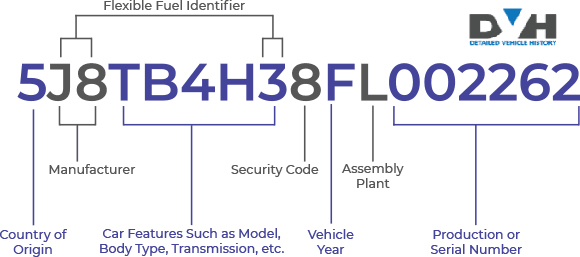
A standard 17-digit Vehicle Identification Number (VIN) is divided into three main sections:
- World Manufacturer Identifier (WMI): The first three characters reveal the vehicle's origin, including the country of manufacture and the manufacturer's name.
- Vehicle Descriptor Section (VDS): The next five characters describe important details about the vehicle, such as its model, body type, engine, and series.
- Vehicle Identifier Section (VIS): The final nine characters uniquely identify each vehicle. This section includes information like the model year, assembly plant, and a serial number assigned to that specific vehicle.
The VIN can be decoded to retrieve all the needed information about the vehicle, including specifications and history. In some cases, the VIN decoder tool can't decode a certain VIN even though you have entered the VIN correctly. How is that happening?
This article clearly explains why you may get the ‘VIN not found ‘message during a VIN check, registration, or at an insurance agency.
Why Do I Get the VIN Not Found Message?
If you've ever wondered, “Why is my VIN not found?” or “Why is my VIN not showing up during a VIN check?”, don't worry, it's a common issue. A “VIN not found” or “invalid VIN” message usually happens for a few simple reasons related to how the number is entered or how the database processes it.
Here are the most common causes:
1. Data entry errors
The most common reason a VIN number is invalid is a typing mistake. It's easy to mix up similar-looking characters, such as using the letter “O” instead of the number “0,” or “I” instead of “1.” Even one incorrect character can cause the system to say your VIN is not found. Double-check each digit carefully before running the check again.
2. Non-standard or incomplete VINs
While the standard VIN comprises 17 characters (digits and capital letters), there are instances where you might encounter non-standard or incomplete VINs.
Some older vehicles (classic vehicles) might have VINs with fewer characters, while custom-built or special vehicles could have VINs that deviate from the standard format. In such cases, the VIN might not be recognised by specific databases or VIN check services.
For example, Carfax, AutoCheck, and some other vehicle history providers cannot decode classic VINs (5 to 13-digit VINs), but our VIN decoder can do that for you.
3. Entered VIN with invalid characters
VINs adhere to a specific format for clarity and precision. One common mistake occurs when invalid characters such as ‘I,' ‘O, or ‘Q' are mistakenly included. These characters are omitted from VINs to prevent confusion between alphabetical letters and numerical digits.
If you've entered a VIN containing invalid characters, you need to recheck and ensure the VIN is correct characters are used to proceed accurately with the VIN check.
4. Altered or Fraudulent VIN
Unfortunately, VIN fraud is a genuine concern in the automotive market. Dishonest sellers may clone or alter VINs to conceal a vehicle's true history, such as its involvement in theft, accidents, or other illegal activities.
If a VIN check returns a “VIN Not Found” message, it could be a red flag indicating potential tampering with the vehicle's identification number.
5. Outside of Data Provider Coverage
Another reason you may receive the “VIN number not found” error message because the provider does not have your vehicle's records. Not all documents are found on all providers. Some have limited databases, and others are simply not up-to-date.
Instead of panicking, know that it's possible that the VIN might exist but hasn't been updated in the database you're using. Now that we know why you may find the error message during a VIN check or insurance registration, let's look at some solutions.
6. Checksum failure (failed VIN validation test)
Each VIN includes a built-in mathematical validation formula called a checksum. If the VIN doesn't pass this test, the system labels it as invalid. This is one of the most technical, but common, reasons why a VIN number would be invalid.
7. Brand-new vehicles not yet in the database
For recently manufactured cars, the VIN might not appear in public databases yet. It can take several weeks before a brand-new vehicle is officially recorded, which is why your VIN might not be found right away.
8. Data license limitations or system restrictions
Some VIN decoding tools use restricted databases or limited data licenses, meaning not all vehicle types are covered. If your VIN is not showing up, the problem may be on the provider's side, not with your vehicle.
What if I Have a Pre-1981 VIN?
Don't worry! Our VIN Decoder service can be used to decode a classic car's VIN (pre-1981). A classic VIN number consists of 5 to 14 digits. Through our classic VIN decoder, you will get a classic report which will show you the details about the vehicle's as the specifications and past history.
How to Solve the VIN Not Found Issue During VIN Check
Did you encounter the frustrating “VIN Not Found” message? Here are several ways to solve this problem and get the VIN check you want:
Verify the VIN on The Vehicle and the Documents
Check the VIN printed on your car's physical components, not just paperwork. The most reliable sources include:
- The dashboard, visible through the windshield on the driver's side
- The driver's side door jamb or door frame
- The vehicle title, registration, or insurance card. Sometimes, documents may contain typos, so always confirm the VIN from the car itself.
Recheck VIN Entry
You can begin by checking for typos. Human error, such as typos or transposed digits, can lead to an invalid VIN entry. Ensure that you've accurately input all 17 characters of the used car VIN, avoiding common mistakes like confusing ‘I', ‘O, or ‘Q' with numerical digits.
Check for Physical Damage
Inspect the vehicle's VIN sticker or frame for any signs of damage. In some cases, physical wear and tear or accidents may have caused some characters in the VIN to become illegible or missing. If you find any discrepancies, consult the vehicle's registration documents or contact the manufacturer for assistance.
Try Other VIN Check Providers
If the VIN check service you're using fails to decode the VIN, consider trying alternative platforms. Some VIN check providers have limited access to vehicle history records compared with others.
One provider we would recommend is Detailed Vehicle History. This provider decodes all VINs regardless of VIN length, age, or vehicle type. With our unique VIN check tool, you can check the VIN of any vehicle and get detailed information in seconds.
Some of the records you will gain access to are:
- Ownership records
- Theft or stolen records
- Accident records
- Title brand records
- Damage records
- Sales records
- Auction history with up to ten images (if available)
- Vehicle usage
- Odometer rollback
- Lien and loan records
- Market value
- Maintenance history
- Vehicle specifications
- Warranty status and more.
If you don't have the VIN number, you can use a license plate lookup to obtain the necessary vehicle information.
The best part is that you can use their free VIN decoding service to get vehicle specifications, car market value, and other data for free on the website and mobile app.
Conclusion
Understand that anyone can get the “VIN not found” or “invalid VIN” message, as no one is above errors. You may have missed one character or included the wrong one, or your data provider may not have the information you need.
Keep in mind that when this happens, there's absolutely nothing to panic about. Just try to enter the right digits, and if it still doesn't work, use a different provider like Detailed Vehicle History. With Detailed Vehicle History, you can get a history report for your vehicle or obtain a window sticker by VIN for your vehicle as well.
Frequently Asked Questions About VIN Not Found
If you cannot find your VIN, you might as well go to the DVLA. The DVLA will help you to apply for a new identity number. After that, the DVLA will give you an authorization letter to get the vehicle stamped with the new VIN.
A VIN number might be invalid because of an error in the VIN itself, such as a mistyped character or a mistake in character length. Other reasons could include a mistake in the data entry or even an old/new vehicle on the database.
Another possible cause is typing mistakes in the system, vehicles that are too new or too old to appear in the database, or past issues like a VIN change or the car being written off.
A VIN may not be recognised because it was entered incorrectly or contains incorrect characters like I, O, and Q, or is not 17-digit long (because some VIN decoder services do not support pre-1981 VINs).
To troubleshoot this problem, you may check on the vehicle's documentation, like registration or the bill of sale, and examine the location of the VIN on the vehicle's body, like the driver's doorjamb or on the dashboard.
The find out if the car's VIN is swapped, look at the VIN in different places, such as the driver's doorjamb and engine bay, and the vehicle's documentation. If you see that the VIN is inconsistent, it might be an early sign that the vehicle's VIN was swapped.
To troubleshoot this problem, you may check on the vehicle's documentation, like registration or the bill of sale, and examine the location of the VIN on the vehicle's body, like the driver's doorjamb or on the dashboard.