
Original Hyundai Window Sticker Lookup by VIN
The Hyundai window sticker is your go-to document for accessing every detail about a vehicle’s original specifications, pricing, features, and more. Make informed decisions with a Hyundai window sticker by VIN.
Table of Contents:
What Is a Hyundai Window Sticker?
A Hyundai window sticker is the factory-original Monroney label that shows your vehicle's VIN, engine specifications, transmission, colors, factory options, MSRP, and fuel economy ratings.
Hyundai vehicles are known for their advanced technology and value-packed features, making the sticker especially valuable for verifying equipment packages and premium upgrades. By preserving the original as-built configuration, it helps owners and buyers confirm authenticity and determine fair market value.
How Do I Get an Original Hyundai Window Sticker by VIN?
Here's how to get your original Hyundai window sticker by VIN:
Provide your VIN, license plate, or year/make/model in the form above and click “Get Window Sticker.”
Verify the vehicle's specifications and complete the quick payment process to access your dashboard.
Access and download your detailed window sticker instantly as a PDF.

Why Do You Need a Hyundai Window Sticker Lookup Tool?
The Hyundai window sticker lookup offers numerous advantages, including:
Verification
A Hyundai window sticker by VIN lookup can help to confirm the authenticity of any Hyundai vehicle.
Resale Value
Provide buyers with accurate details about the car's features and history with a window sticker.
Peace of Mind
Ensure the Hyundai meets safety and performance standards before committing to a new or used car purchase.
Decision Making
Compare different trims and options before purchasing by reviewing the window stickers of each vehicle.
What a Hyundai Window Sticker Tells You About the Vehicle?
A Hyundai window sticker gives you a complete overview of the vehicle as it was when it left the factory. Here's what you can learn from it:
Original MSRP
See the Manufacturer's Suggested Retail Price, along with detailed pricing for factory-installed options and packages. This helps you understand the car's original value.
Trim Level and Features
Find out the exact trim level, such as SE, SEL, or Limited, and get a clear breakdown of standard and optional features that were included with that specific model.
Factory Options and Packages
The window sticker lists any optional features or packages added to the base model, such as tech upgrades, premium audio, sunroofs, or appearance packages.
Performance Specifications
Review important mechanical details like engine type, horsepower, torque, transmission, and drivetrain (FWD, AWD, etc.). It's a quick way to understand how the car is built to perform.
Exterior and Interior Colors
A Hyundai sticker lists original paint colors and interior color, including factory paint codes. This is especially useful for confirming authenticity and planning any future repairs or restorations.
Safety and Technology Features
Check for advanced safety systems like Hyundai SmartSense, lane-keeping assist, blind spot monitoring, and high-tech features such as Blue Link, touchscreen displays, and premium sound systems.
Warranty Information
Check the original factory warranty coverage, including powertrain, bumper-to-bumper, corrosion, and hybrid system (if applicable). This helps buyers know what coverage may still apply at the time of purchase.
Fuel Economy Ratings
View the official EPA fuel economy estimates for city, highway, and combined MPG. These ratings are important for budgeting fuel costs and understanding overall efficiency.
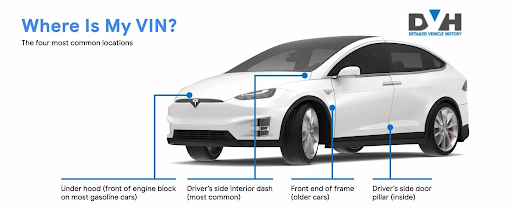
Where is the VIN on a Hyundai?
There are several locations where the VIN can be found on a Hyundai. The most common places you can find it are:
- Driver’s side dashboard
- Driver’s side door frame
- Vehicle registration
- Insurance documents
- Owner’s manual or service records
Window Stickers for All Hyundai Models
We provide window stickers for all Hyundai models, including:
Don’t Stop at Stickers! Check Other Hyundai Tools
Try our other tools to get access to more information about any Hyundai history, including theft records, damages, title brand records, accidents, and more.
FAQs About Hyundai Window Stickers
How do I decode a Hyundai VIN number?
Simply enter the VIN into our Hyundai VIN decoder to reveal details like specs, engine type, transmission, and more. It's fast, reliable and comes at no cost.
What can I learn from my Hyundai VIN?
Your Hyundai VIN unlocks information like trim level, original specifications, and warranty status. You can also unlock the VIN history using a VIN number lookup tool to access records like title status, theft, odometer readings, lien, etc.
How can I find a Hyundai window sticker without a VIN?
You can search for the window sticker using the US license plate or Year-Make-Model (YMM) details.
How can I decode a 13-digit VIN?
Depending on what you're looking for, you can use our paid or free 13 digit VIN decoder. To access the factory build, use the classic VIN decoder and for the classic car history, simply use our classic car VIN lookup tool.
Can an Hyundai window sticker confirm if my Santa Fe has the 2.5L Turbo instead of the base engine?
Yes. Engine displacement is standard sticker information, so it clearly shows whether your specific Santa Fe left the factory with the naturally aspirated engine or the turbocharged upgrade.
How can I tell if my Hyundai has HTRAC All-Wheel Drive?
Check the drivetrain section of the sticker. HTRAC is listed by name when installed, confirming whether the vehicle has Hyundai's electronically controlled all-wheel-drive system.
Can a window sticker show whether my Elantra or Sonata is the N Line trim?
Yes. Trim level appears clearly near the top of the sticker, and N Line models list their sport-tuned suspension and unique styling as part of that trim's standard equipment.
Is there a way to confirm my Hyundai came with Hyundai SmartSense safety tech?
Yes. SmartSense bundles features like forward collision warning and lane-keeping assist, and it's listed either as standard equipment or a separate option depending on trim.
Is there a way to confirm my Palisade has the Calligraphy trim rather than Limited?
Yes. The sticker's trim designation identifies Calligraphy specifically, along with the additional standard features like quilted leather seats that come exclusive to that top trim.
Can a window sticker confirm if my Hyundai has a Bose or Harman Kardon premium sound system?
Yes. Premium audio upgrades are listed by brand name and price, separate from the standard factory sound system included on base trims.
How can I tell if my Ioniq 5 or Ioniq 6 has Vehicle-to-Load (V2L) capability?
This feature is typically included as standard equipment on most trims, and the sticker's technology section confirms it along with the specific battery pack installed.
Is there a way to check if my Hyundai has a panoramic sunroof instead of the standard single-panel sunroof?
Yes. Roof type is listed in the Hyundai window sticker as a specific equipment line, confirming whether the vehicle left the factory with the larger panoramic glass roof option.
Can a window sticker show whether my Elantra N or other N model has the factory performance package?
Yes. Performance-focused options like an upgraded brake package or limited-slip differential are itemized separately from the base N model's standard equipment.
How can I confirm my Santa Fe has the XRT trim's off-road-focused equipment?
The trim line on the Hyundai window sticker identifies XRT directly, and its unique features like all-terrain tires and skid plates are listed as standard for that specific trim.